This article is more than one year old. Older articles may contain outdated content. Check that the information in the page has not become incorrect since its publication.
The Cloud Controller Manager Chicken and Egg Problem
Kubernetes 1.31 completed the largest migration in Kubernetes history, removing the in-tree cloud provider. While the component migration is now done, this leaves some additional complexity for users and installer projects (for example, kOps or Cluster API) . We will go over those additional steps and failure points and make recommendations for cluster owners. This migration was complex and some logic had to be extracted from the core components, building four new subsystems.
- Cloud controller manager (KEP-2392)
- API server network proxy (KEP-1281)
- kubelet credential provider plugins (KEP-2133)
- Storage migration to use CSI (KEP-625)
The cloud controller manager is part of the control plane. It is a critical component that replaces some functionality that existed previously in the kube-controller-manager and the kubelet.
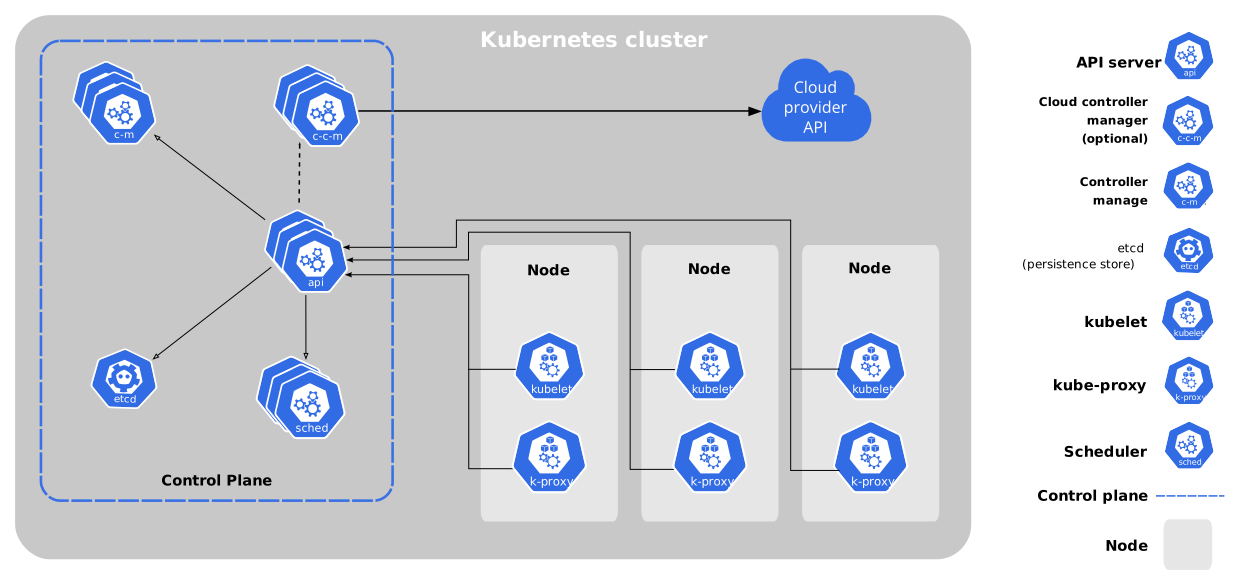
Components of Kubernetes
One of the most critical functionalities of the cloud controller manager is the node controller, which is responsible for the initialization of the nodes.
As you can see in the following diagram, when the kubelet starts, it registers the Node object with the apiserver, Tainting the node so it can be processed first by the cloud-controller-manager. The initial Node is missing the cloud-provider specific information, like the Node Addresses and the Labels with the cloud provider specific information like the Node, Region and Instance type information.
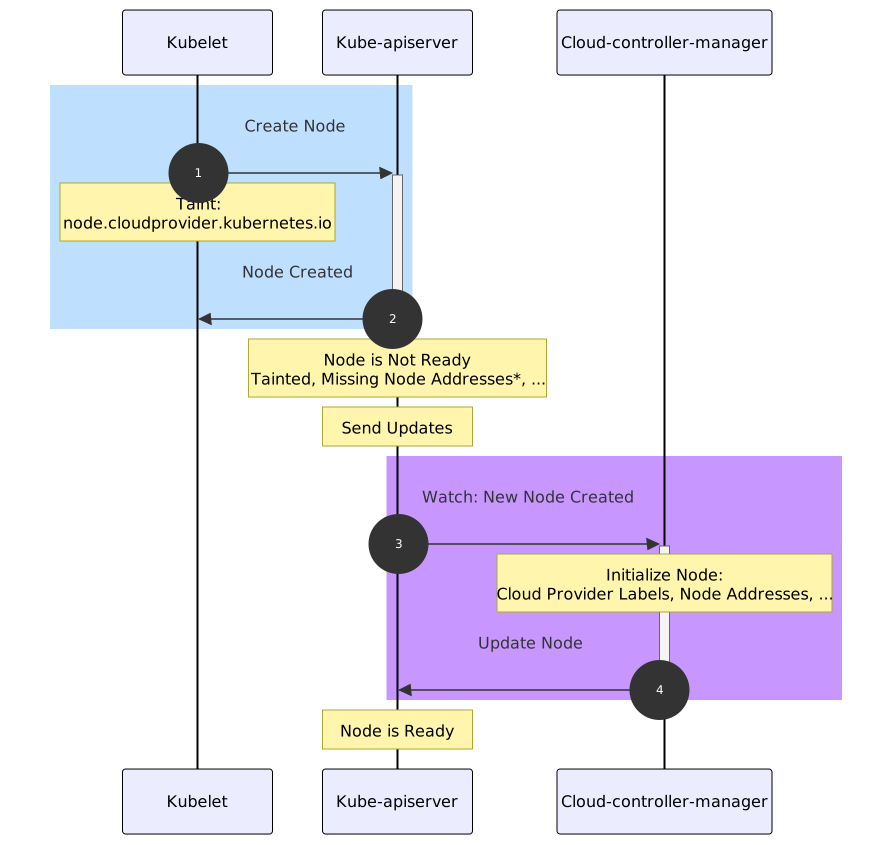
Chicken and egg problem sequence diagram
This new initialization process adds some latency to the node readiness. Previously, the kubelet
was able to initialize the node at the same time it created the node. Since the logic has moved
to the cloud-controller-manager, this can cause a chicken and egg problem
during the cluster bootstrapping for those Kubernetes architectures that do not deploy the
controller manager as the other components of the control plane, commonly as static pods,
standalone binaries or daemonsets/deployments with tolerations to the taints and using
hostNetwork (more on this below)
Examples of the dependency problem
As noted above, it is possible during bootstrapping for the cloud-controller-manager to be unschedulable and as such the cluster will not initialize properly. The following are a few concrete examples of how this problem can be expressed and the root causes for why they might occur.
These examples assume you are running your cloud-controller-manager using a Kubernetes resource (e.g. Deployment, DaemonSet, or similar) to control its lifecycle. Because these methods rely on Kubernetes to schedule the cloud-controller-manager, care must be taken to ensure it will schedule properly.
Example: Cloud controller manager not scheduling due to uninitialized taint
As noted in the Kubernetes documentation, when the kubelet is started with the command line
flag --cloud-provider=external, its corresponding Node object will have a no schedule taint
named node.cloudprovider.kubernetes.io/uninitialized added. Because the cloud-controller-manager
is responsible for removing the no schedule taint, this can create a situation where a
cloud-controller-manager that is being managed by a Kubernetes resource, such as a Deployment
or DaemonSet, may not be able to schedule.
If the cloud-controller-manager is not able to be scheduled during the initialization of the
control plane, then the resulting Node objects will all have the
node.cloudprovider.kubernetes.io/uninitialized no schedule taint. It also means that this taint
will not be removed as the cloud-controller-manager is responsible for its removal. If the no
schedule taint is not removed, then critical workloads, such as the container network interface
controllers, will not be able to schedule, and the cluster will be left in an unhealthy state.
Example: Cloud controller manager not scheduling due to not-ready taint
The next example would be possible in situations where the container network interface (CNI) is waiting for IP address information from the cloud-controller-manager (CCM), and the CCM has not tolerated the taint which would be removed by the CNI.
The Kubernetes documentation describes the node.kubernetes.io/not-ready taint as follows:
"The Node controller detects whether a Node is ready by monitoring its health and adds or removes this taint accordingly."
One of the conditions that can lead to a Node resource having this taint is when the container network has not yet been initialized on that node. As the cloud-controller-manager is responsible for adding the IP addresses to a Node resource, and the IP addresses are needed by the container network controllers to properly configure the container network, it is possible in some circumstances for a node to become stuck as not ready and uninitialized permanently.
This situation occurs for a similar reason as the first example, although in this case, the
node.kubernetes.io/not-ready taint is used with the no execute effect and thus will cause the
cloud-controller-manager not to run on the node with the taint. If the cloud-controller-manager is
not able to execute, then it will not initialize the node. It will cascade into the container
network controllers not being able to run properly, and the node will end up carrying both the
node.cloudprovider.kubernetes.io/uninitialized and node.kubernetes.io/not-ready taints,
leaving the cluster in an unhealthy state.
Our Recommendations
There is no one “correct way” to run a cloud-controller-manager. The details will depend on the specific needs of the cluster administrators and users. When planning your clusters and the lifecycle of the cloud-controller-managers please consider the following guidance:
For cloud-controller-managers running in the same cluster, they are managing.
- Use host network mode, rather than the pod network: in most cases, a cloud controller manager will need to communicate with an API service endpoint associated with the infrastructure. Setting “hostNetwork” to true will ensure that the cloud controller is using the host networking instead of the container network and, as such, will have the same network access as the host operating system. It will also remove the dependency on the networking plugin. This will ensure that the cloud controller has access to the infrastructure endpoint (always check your networking configuration against your infrastructure provider’s instructions).
- Use a scalable resource type.
DeploymentsandDaemonSetsare useful for controlling the lifecycle of a cloud controller. They allow easy access to running multiple copies for redundancy as well as using the Kubernetes scheduling to ensure proper placement in the cluster. When using these primitives to control the lifecycle of your cloud controllers and running multiple replicas, you must remember to enable leader election, or else your controllers will collide with each other which could lead to nodes not being initialized in the cluster. - Target the controller manager containers to the control plane. There might exist other
controllers which need to run outside the control plane (for example, Azure’s node manager
controller). Still, the controller managers themselves should be deployed to the control plane.
Use a node selector or affinity stanza to direct the scheduling of cloud controllers to the
control plane to ensure that they are running in a protected space. Cloud controllers are vital
to adding and removing nodes to a cluster as they form a link between Kubernetes and the
physical infrastructure. Running them on the control plane will help to ensure that they run
with a similar priority as other core cluster controllers and that they have some separation
from non-privileged user workloads.
- It is worth noting that an anti-affinity stanza to prevent cloud controllers from running on the same host is also very useful to ensure that a single node failure will not degrade the cloud controller performance.
- Ensure that the tolerations allow operation. Use tolerations on the manifest for the cloud
controller container to ensure that it will schedule to the correct nodes and that it can run
in situations where a node is initializing. This means that cloud controllers should tolerate
the
node.cloudprovider.kubernetes.io/uninitializedtaint, and it should also tolerate any taints associated with the control plane (for example,node-role.kubernetes.io/control-planeornode-role.kubernetes.io/master). It can also be useful to tolerate thenode.kubernetes.io/not-readytaint to ensure that the cloud controller can run even when the node is not yet available for health monitoring.
For cloud-controller-managers that will not be running on the cluster they manage (for example, in a hosted control plane on a separate cluster), then the rules are much more constrained by the dependencies of the environment of the cluster running the cloud-controller-manager. The advice for running on a self-managed cluster may not be appropriate as the types of conflicts and network constraints will be different. Please consult the architecture and requirements of your topology for these scenarios.
Example
This is an example of a Kubernetes Deployment highlighting the guidance shown above. It is important to note that this is for demonstration purposes only, for production uses please consult your cloud provider’s documentation.
apiVersion: apps/v1
kind: Deployment
metadata:
  labels:
    app.kubernetes.io/name: cloud-controller-manager
  name: cloud-controller-manager
  namespace: kube-system
spec:
  replicas: 2
  selector:
    matchLabels:
      app.kubernetes.io/name: cloud-controller-manager
  strategy:
    type: Recreate
  template:
    metadata:
      labels:
        app.kubernetes.io/name: cloud-controller-manager
      annotations:
        kubernetes.io/description: Cloud controller manager for my infrastructure
    spec:
      containers: # the container details will depend on your specific cloud controller manager
      - name: cloud-controller-manager
        command:
        - /bin/my-infrastructure-cloud-controller-manager
        - --leader-elect=true
        - -v=1
        image: registry/my-infrastructure-cloud-controller-manager@latest
        resources:
          requests:
            cpu: 200m
            memory: 50Mi
      hostNetwork: true # these Pods are part of the control plane
      nodeSelector:
        node-role.kubernetes.io/control-plane: ""
      affinity:
        podAntiAffinity:
          requiredDuringSchedulingIgnoredDuringExecution:
          - topologyKey: "kubernetes.io/hostname"
            labelSelector:
              matchLabels:
                app.kubernetes.io/name: cloud-controller-manager
      tolerations:
      - effect: NoSchedule
        key: node-role.kubernetes.io/master
        operator: Exists
      - effect: NoExecute
        key: node.kubernetes.io/unreachable
        operator: Exists
        tolerationSeconds: 120
      - effect: NoExecute
        key: node.kubernetes.io/not-ready
        operator: Exists
        tolerationSeconds: 120
      - effect: NoSchedule
        key: node.cloudprovider.kubernetes.io/uninitialized
        operator: Exists
      - effect: NoSchedule
        key: node.kubernetes.io/not-ready
        operator: Exists
When deciding how to deploy your cloud controller manager it is worth noting that cluster-proportional, or resource-based, pod autoscaling is not recommended. Running multiple replicas of a cloud controller manager is good practice for ensuring high-availability and redundancy, but does not contribute to better performance. In general, only a single instance of a cloud controller manager will be reconciling a cluster at any given time.