# Cloud Controller Manager

LLMS index: [llms.txt](/llms.txt)

---

<!-- overview -->


  <div class="feature-state-notice feature-beta">
      <span class="feature-state-name">FEATURE STATE:</span>
      <code>Kubernetes v1.11 [beta]</code>
    </div>


Cloud infrastructure technologies let you run Kubernetes on public, private, and hybrid clouds.
Kubernetes believes in automated, API-driven infrastructure without tight coupling between
components.

<p><p>The cloud-controller-manager is a Kubernetes <a class='glossary-tooltip' title='The container orchestration layer that exposes the API and interfaces to define, deploy, and manage the lifecycle of containers.' data-bs-toggle='tooltip' data-bs-placement='top' href='/docs/reference/glossary/?all=true#term-control-plane' target='_blank' aria-label='control plane'>control plane</a> component
that embeds cloud-specific control logic. The cloud controller manager lets you link your
cluster into your cloud provider's API, and separates out the components that interact
with that cloud platform from components that only interact with your cluster.</p></p>
<p>By decoupling the interoperability logic between Kubernetes and the underlying cloud
infrastructure, the cloud-controller-manager component enables cloud providers to release
features at a different pace compared to the main Kubernetes project.</p>

The cloud-controller-manager is structured using a plugin
mechanism that allows different cloud providers to integrate their platforms with Kubernetes.

<!-- body -->

## Design

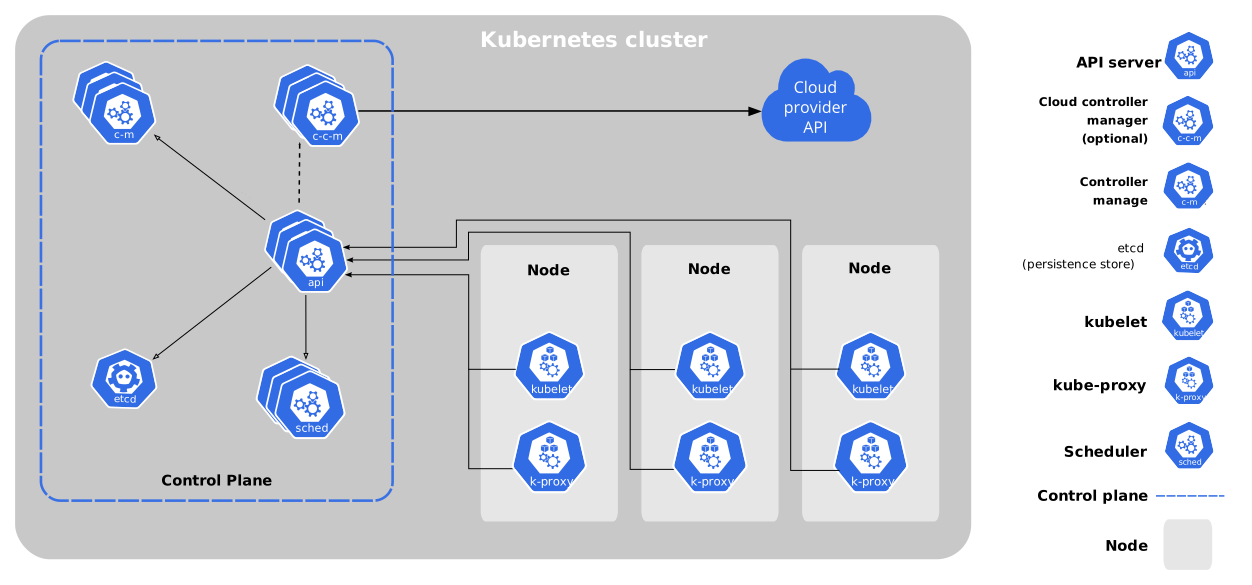
![Kubernetes components](/images/docs/components-of-kubernetes.svg)

The cloud controller manager runs in the control plane as a replicated set of processes
(usually, these are containers in Pods). Each cloud-controller-manager implements
multiple <a class='glossary-tooltip' title='A control loop that watches the shared state of the cluster through the apiserver and makes changes attempting to move the current state towards the desired state.' data-bs-toggle='tooltip' data-bs-placement='top' href='/docs/concepts/architecture/controller/' target='_blank' aria-label='controllers'>controllers</a> in a single
process.


<div class="alert alert-info" role="note"><h4 class="alert-heading">Note:</h4>You can also run the cloud controller manager as a Kubernetes
<a class='glossary-tooltip' title='Resources that extend the functionality of Kubernetes.' data-bs-toggle='tooltip' data-bs-placement='top' href='/docs/concepts/cluster-administration/addons/' target='_blank' aria-label='addon'>addon</a> rather than as part
of the control plane.</div>


## Cloud controller manager functions {#functions-of-the-ccm}

The controllers inside the cloud controller manager include:

### Node controller

The node controller is responsible for updating <a class='glossary-tooltip' title='A node is a worker machine in Kubernetes.' data-bs-toggle='tooltip' data-bs-placement='top' href='/docs/concepts/architecture/nodes/' target='_blank' aria-label='Node'>Node</a> objects
when new servers are created in your cloud infrastructure. The node controller obtains information about the
hosts running inside your tenancy with the cloud provider. The node controller performs the following functions:

1. Update a Node object with the corresponding server's unique identifier obtained from the cloud provider API.
1. Annotating and labelling the Node object with cloud-specific information, such as the region the node
   is deployed into and the resources (CPU, memory, etc) that it has available.
1. Obtain the node's hostname and network addresses.
1. Verifying the node's health. In case a node becomes unresponsive, this controller checks with
   your cloud provider's API to see if the server has been deactivated / deleted / terminated.
   If the node has been deleted from the cloud, the controller deletes the Node object from your Kubernetes
   cluster.

Some cloud provider implementations split this into a node controller and a separate node
lifecycle controller.

### Route controller

The route controller is responsible for configuring routes in the cloud
appropriately so that containers on different nodes in your Kubernetes
cluster can communicate with each other.

Depending on the cloud provider, the route controller might also allocate blocks
of IP addresses for the Pod network.

### Service controller

<a class='glossary-tooltip' title='A way to expose an application running on a set of Pods as a network service.' data-bs-toggle='tooltip' data-bs-placement='top' href='/docs/concepts/services-networking/service/' target='_blank' aria-label='Services'>Services</a> integrate with cloud
infrastructure components such as managed load balancers, IP addresses, network
packet filtering, and target health checking. The service controller interacts with your
cloud provider's APIs to set up load balancers and other infrastructure components
when you declare a Service resource that requires them.

## Authorization

This section breaks down the access that the cloud controller manager requires
on various API objects, in order to perform its operations.

### Node controller {#authorization-node-controller}

The Node controller only works with Node objects. It requires full access
to read and modify Node objects.

`v1/Node`:

- get
- list
- create
- update
- patch
- watch
- delete

### Route controller {#authorization-route-controller}

The route controller listens to Node object creation and configures
routes appropriately. It requires Get access to Node objects.

`v1/Node`:

- get

### Service controller {#authorization-service-controller}

The service controller watches for Service object **create**, **update** and **delete** events and then
configures load balancers for those Services appropriately.

To access Services, it requires **list**, and **watch** access. To update Services, it requires
**patch** and **update** access to the `status` subresource.

`v1/Service`:

- list
- get
- watch
- patch
- update

### Others {#authorization-miscellaneous}

The implementation of the core of the cloud controller manager requires access to create Event
objects, and to ensure secure operation, it requires access to create ServiceAccounts.

`v1/Event`:

- create
- patch
- update

`v1/ServiceAccount`:

- create

The <a class='glossary-tooltip' title='Manages authorization decisions, allowing admins to dynamically configure access policies through the Kubernetes API.' data-bs-toggle='tooltip' data-bs-placement='top' href='/docs/reference/access-authn-authz/rbac/' target='_blank' aria-label='RBAC'>RBAC</a> ClusterRole for the cloud
controller manager looks like:

```yaml
apiVersion: rbac.authorization.k8s.io/v1
kind: ClusterRole
metadata:
  name: cloud-controller-manager
rules:
- apiGroups:
  - ""
  resources:
  - events
  verbs:
  - create
  - patch
  - update
- apiGroups:
  - ""
  resources:
  - nodes
  verbs:
  - '*'
- apiGroups:
  - ""
  resources:
  - nodes/status
  verbs:
  - patch
- apiGroups:
  - ""
  resources:
  - services
  verbs:
  - list
  - watch
- apiGroups:
  - ""
  resources:
  - services/status
  verbs:
  - patch
  - update
- apiGroups:
  - ""
  resources:
  - serviceaccounts
  verbs:
  - create
- apiGroups:
  - ""
  resources:
  - persistentvolumes
  verbs:
  - get
  - list
  - update
  - watch
```


## What's next

* [Cloud Controller Manager Administration](/docs/tasks/administer-cluster/running-cloud-controller/#cloud-controller-manager)
  has instructions on running and managing the cloud controller manager.

* To upgrade a HA control plane to use the cloud controller manager, see 
  [Migrate Replicated Control Plane To Use Cloud Controller Manager](/docs/tasks/administer-cluster/controller-manager-leader-migration/).

* Want to know how to implement your own cloud controller manager, or extend an existing project?

  - The cloud controller manager uses Go interfaces, specifically, `CloudProvider` interface defined in
    [`cloud.go`](https://github.com/kubernetes/cloud-provider/blob/release-1.21/cloud.go#L42-L69)
    from [kubernetes/cloud-provider](https://github.com/kubernetes/cloud-provider) to allow
    implementations from any cloud to be plugged in.
  - The implementation of the shared controllers highlighted in this document (Node, Route, and Service),
    and some scaffolding along with the shared cloudprovider interface, is part of the Kubernetes core.
    Implementations specific to cloud providers are outside the core of Kubernetes and implement
    the `CloudProvider` interface.
  - For more information about developing plugins,
    see [Developing Cloud Controller Manager](/docs/tasks/administer-cluster/developing-cloud-controller-manager/).