# Pods
LLMS index: [llms.txt](/llms.txt)
---
_Pods_ are the smallest deployable units of computing that you can create and manage in Kubernetes.
A _Pod_ (as in a pod of whales or pea pod) is a group of one or more
containers, with shared storage and network resources, and a specification for how to run the containers. A Pod's contents are always co-located and
co-scheduled, and run in a shared context. A Pod models an
application-specific "logical host": it contains one or more application
containers which are relatively tightly coupled.
In non-cloud contexts, applications executed on the same physical or virtual machine are analogous to cloud applications executed on the same logical host.
As well as application containers, a Pod can contain
init containers that run
during Pod startup. You can also inject
ephemeral containers
for debugging a running Pod.
## What is a Pod?
Note:
You need to install a container runtime
into each node in the cluster so that Pods can run there.
The shared context of a Pod is a set of Linux namespaces, cgroups, and
potentially other facets of isolation - the same things that isolate a container. Within a Pod's context, the individual applications may have
further sub-isolations applied.
A Pod is similar to a set of containers with shared namespaces and shared filesystem volumes.
Pods in a Kubernetes cluster are used in two main ways:
* **Pods that run a single container**. The "one-container-per-Pod" model is the
most common Kubernetes use case; in this case, you can think of a Pod as a
wrapper around a single container; Kubernetes manages Pods rather than managing
the containers directly.
* **Pods that run multiple containers that need to work together**. A Pod can
encapsulate an application composed of
[multiple co-located containers](#how-pods-manage-multiple-containers) that are
tightly coupled and need to share resources. These co-located containers
form a single cohesive unit.
Grouping multiple co-located and co-managed containers in a single Pod is a
relatively advanced use case. You should use this pattern only in specific
instances in which your containers are tightly coupled.
You don't need to run multiple containers to provide replication (for resilience
or capacity); if you need multiple replicas, see
[Workload management](/docs/concepts/workloads/controllers/).
## Using Pods
The following is an example of a Pod which consists of a container running the image `nginx:1.14.2`.
To create the Pod shown above, run the following command:
```shell
kubectl apply -f https://k8s.io/examples/pods/simple-pod.yaml
```
Pods are generally not created directly and are created using workload resources.
See [Working with Pods](#working-with-pods) for more information on how Pods are used
with workload resources.
### Workload resources for managing pods
Usually you don't need to create Pods directly, even singleton Pods. Instead, create them using workload resources such as Deployment or Job.
If your Pods need to track state, consider the
StatefulSet resource.
Each Pod is meant to run a single instance of a given application. If you want to
scale your application horizontally (to provide more overall resources by running
more instances), you should use multiple Pods, one for each instance. In
Kubernetes, this is typically referred to as _replication_.
Replicated Pods are usually created and managed as a group by a workload resource
and its controller.
See [Pods and controllers](#pods-and-controllers) for more information on how
Kubernetes uses workload resources, and their controllers, to implement application
scaling and auto-healing.
Pods natively provide two kinds of shared resources for their constituent containers:
[networking](#pod-networking) and [storage](#pod-storage).
## Working with Pods
You'll rarely create individual Pods directly in Kubernetes—even singleton Pods. This
is because Pods are designed as relatively ephemeral, disposable entities. When
a Pod gets created (directly by you, or indirectly by a
controller), the new Pod is
scheduled to run on a Node in your cluster.
The Pod remains on that node until the Pod finishes execution, the Pod object is deleted,
the Pod is *evicted* for lack of resources, or the node fails.
Note:
Restarting a container in a Pod should not be confused with restarting a Pod. A Pod
is not a process, but an environment for running container(s). A Pod persists until
it is deleted.
The name of a Pod must be a valid
[DNS subdomain](/docs/concepts/overview/working-with-objects/names#dns-subdomain-names)
value, but this can produce unexpected results for the Pod hostname. For best compatibility,
the name should follow the more restrictive rules for a
[DNS label](/docs/concepts/overview/working-with-objects/names#dns-label-names).
### Pod OS
FEATURE STATE:Kubernetes v1.25 [stable]
You should set the `.spec.os.name` field to either `windows` or `linux` to indicate the
operating system that the containers in that Pod require. These two are the only operating
systems supported for now by Kubernetes. In the future, this list may be expanded.
The kubelet refuses to run a Pod if the value of `.spec.os.name` does not match the
operating system of the node. However, in Kubernetes
v1.36, the value of `.spec.os.name` does not affect
how the kube-scheduler
picks a node for the Pod to run on. In any cluster where there is more than one operating system for
running nodes, you should set the
[kubernetes.io/os](/docs/reference/labels-annotations-taints/#kubernetes-io-os)
label correctly on each node, and define pods with a `nodeSelector` based on the operating system
label. The kube-scheduler assigns your pod to a node based on other criteria and may or may not
succeed in picking a suitable node placement where the node OS is right for the containers in that Pod.
The [Pod security standards](/docs/concepts/security/pod-security-standards/) also use this
field to avoid enforcing policies that aren't relevant to the operating system.
### Pods and controllers
You can use workload resources to create and manage multiple Pods for you. A controller
for the resource handles replication and rollout and automatic healing in case of
Pod failure. For example, if a Node fails, a controller notices that Pods on that
Node have stopped working and creates a replacement Pod. The scheduler places the
replacement Pod onto a healthy Node.
Here are some examples of workload resources that manage one or more Pods:
* Deployment
* StatefulSet
* DaemonSet
### Specifying a scheduling group
FEATURE STATE:Kubernetes v1.35 [alpha](disabled by default)
By default, Kubernetes schedules every Pod individually. However, some tightly-coupled applications
need a group of Pods to be scheduled simultaneously to function correctly.
You can link a Pod to a [PodGroup](/docs/concepts/workloads/podgroup-api/) using the
[scheduling group](/docs/concepts/workloads/pods/scheduling-group/) field
(`spec.schedulingGroup`). This tells the `kube-scheduler` that the `Pod` belongs to a specific
group, enabling it to apply group-level coordinated placement decisions for the entire group at once.
### Pod templates
Controllers for workload resources create Pods
from a _pod template_ and manage those Pods on your behalf.
PodTemplates are specifications for creating Pods, and are included in workload resources such as
[Deployments](/docs/concepts/workloads/controllers/deployment/),
[Jobs](/docs/concepts/workloads/controllers/job/), and
[DaemonSets](/docs/concepts/workloads/controllers/daemonset/).
Each controller for a workload resource uses the `PodTemplate` inside the workload
object to make actual Pods. The `PodTemplate` is part of the desired state of whatever
workload resource you used to run your app.
When you create a Pod, you can include
[environment variables](/docs/tasks/inject-data-application/define-environment-variable-container/)
in the Pod template for the containers that run in the Pod.
The sample below is a manifest for a simple Job with a `template` that starts one
container. The container in that Pod prints a message then pauses.
```yaml
apiVersion: batch/v1
kind: Job
metadata:
name: hello
spec:
template:
# This is the pod template
spec:
containers:
- name: hello
image: busybox:1.28
command: ['sh', '-c', 'echo "Hello, Kubernetes!" && sleep 3600']
restartPolicy: OnFailure
# The pod template ends here
```
Modifying the pod template or switching to a new pod template has no direct effect
on the Pods that already exist. If you change the pod template for a workload
resource, that resource needs to create replacement Pods that use the updated template.
For example, the StatefulSet controller ensures that the running Pods match the current
pod template for each StatefulSet object. If you edit the StatefulSet to change its pod
template, the StatefulSet starts to create new Pods based on the updated template.
Eventually, all of the old Pods are replaced with new Pods, and the update is complete.
Each workload resource implements its own rules for handling changes to the Pod template.
If you want to read more about StatefulSet specifically, read
[Update strategy](/docs/tutorials/stateful-application/basic-stateful-set/#updating-statefulsets) in the StatefulSet Basics tutorial.
On Nodes, the kubelet does not
directly observe or manage any of the details around pod templates and updates; those
details are abstracted away. That abstraction and separation of concerns simplifies
system semantics, and makes it feasible to extend the cluster's behavior without
changing existing code.
## Pod update and replacement
As mentioned in the previous section, when the Pod template for a workload
resource is changed, the controller creates new Pods based on the updated
template instead of updating or patching the existing Pods.
Kubernetes doesn't prevent you from managing Pods directly. It is possible to
update some fields of a running Pod, in place. However, Pod update operations
like
[`patch`](/docs/reference/generated/kubernetes-api/v1.36/#patch-pod-v1-core), and
[`replace`](/docs/reference/generated/kubernetes-api/v1.36/#replace-pod-v1-core)
have some limitations:
- Most of the metadata about a Pod is immutable. For example, you cannot
change the `namespace`, `name`, `uid`, or `creationTimestamp` fields.
- If the `metadata.deletionTimestamp` is set, no new entry can be added to the
`metadata.finalizers` list.
- Pod updates may not change fields other than `spec.containers[*].image`,
`spec.initContainers[*].image`, `spec.activeDeadlineSeconds`, `spec.terminationGracePeriodSeconds`,
`spec.tolerations` or `spec.schedulingGates`. For `spec.tolerations`, you can only add new entries.
- When updating the `spec.activeDeadlineSeconds` field, two types of updates
are allowed:
1. setting the unassigned field to a positive number;
1. updating the field from a positive number to a smaller, non-negative
number.
### Pod subresources
The above update rules apply to regular pod updates, but other pod fields can be updated through _subresources_.
- **Resize:** The `resize` subresource allows container resources (`spec.containers[*].resources`) to be updated.
See [Resize Container Resources](/docs/tasks/configure-pod-container/resize-container-resources/) for more details.
- **Ephemeral Containers:** The `ephemeralContainers` subresource allows
ephemeral containers
to be added to a Pod.
See [Ephemeral Containers](/docs/concepts/workloads/pods/ephemeral-containers/) for more details.
- **Status:** The `status` subresource allows the pod status to be updated.
This is typically only used by the Kubelet and other system controllers.
- **Binding:** The `binding` subresource allows setting the pod's `spec.nodeName` via a `Binding` request.
This is typically only used by the scheduler.
### Pod generation
- The `metadata.generation` field is unique. It will be automatically set by the
system such that new pods have a `metadata.generation` of 1, and every update to
mutable fields in the pod's spec will increment the `metadata.generation` by 1.
FEATURE STATE:Kubernetes v1.35 [stable](enabled by default)
- `observedGeneration` is a field that is captured in the `status` section of the Pod
object. The Kubelet will set `status.observedGeneration`
to track the pod state to the current pod status. The pod's `status.observedGeneration` will reflect the
`metadata.generation` of the pod at the point that the pod status is being reported.
Note:
The status.observedGeneration field is managed by the kubelet and external controllers should not modify this field.
Different status fields may either be associated with the `metadata.generation` of the current sync loop, or with the
`metadata.generation` of the previous sync loop. The key distinction is whether a change in the `spec` is reflected
directly in the `status` or is an indirect result of a running process.
#### Direct Status Updates
For status fields where the allocated spec is directly reflected, the `observedGeneration` will
be associated with the current `metadata.generation` (Generation N).
This behavior applies to:
- **Resize Status**: The status of a resource resize operation.
- **Allocated Resources**: The resources allocated to the Pod after a resize.
- **Ephemeral Containers**: When a new ephemeral container is added, and it is in `Waiting` state.
#### Indirect Status Updates
For status fields that are an indirect result of running the spec, the `observedGeneration` will be associated
with the `metadata.generation` of the previous sync loop (Generation N-1).
This behavior applies to:
- **Container Image**: The `ContainerStatus.ImageID` reflects the image from the previous generation until the new image
is pulled and the container is updated.
- **Actual Resources**: During an in-progress resize, the actual resources in use still belong to the previous generation's
request.
- **Container state**: During an in-progress resize, with require restart policy reflects the previous generation's
request.
- **activeDeadlineSeconds** & **terminationGracePeriodSeconds** & **deletionTimestamp**: The effects of these fields on the
Pod's status are a result of the previously observed specification.
## Resource sharing and communication
Pods enable data sharing and communication among their constituent
containers.
### Storage in Pods {#pod-storage}
A Pod can specify a set of shared storage
volumes. All containers
in the Pod can access the shared volumes, allowing those containers to
share data. Volumes also allow persistent data in a Pod to survive
in case one of the containers within needs to be restarted. See
[Storage](/docs/concepts/storage/) for more information on how
Kubernetes implements shared storage and makes it available to Pods.
### Pod networking
Each Pod is assigned a unique IP address for each address family. Every
container in a Pod shares the network namespace, including the IP address and
network ports. Inside a Pod (and **only** then), the containers that belong to the Pod
can communicate with one another using `localhost`. When containers in a Pod communicate
with entities *outside the Pod*,
they must coordinate how they use the shared network resources (such as ports).
Within a Pod, containers share an IP address and port space, and
can find each other via `localhost`. The containers in a Pod can also communicate
with each other using standard inter-process communications like SystemV semaphores
or POSIX shared memory. Containers in different Pods have distinct IP addresses
and can not communicate by OS-level IPC without special configuration.
Containers that want to interact with a container running in a different Pod can
use IP networking to communicate.
Containers within the Pod see the system hostname as being the same as the configured
`name` for the Pod. There's more about this in the [networking](/docs/concepts/cluster-administration/networking/)
section.
## Pod security settings {#pod-security}
To set security constraints on Pods and containers, you use the
`securityContext` field in the Pod specification. This field gives you
granular control over what a Pod or individual containers can do. See [Advanced Pod Configuration](/docs/concepts/workloads/pods/advanced-pod-config/) for more details.
For basic security configuration, you should meet the Baseline Pod security standard and run containers as non-root. You can set simple security contexts:
```yaml
apiVersion: v1
kind: Pod
metadata:
name: security-context-demo
spec:
securityContext:
runAsUser: 1000
runAsGroup: 3000
fsGroup: 2000
containers:
- name: sec-ctx-demo
image: busybox
command: ["sh", "-c", "sleep 1h"]
```
For advanced security context configuration including capabilities, seccomp profiles, and detailed security options, see the [security concepts](/docs/concepts/security/) section.
* To learn about kernel-level security constraints that you can use,
see [Linux kernel security constraints for Pods and containers](/docs/concepts/security/linux-kernel-security-constraints).
* To learn more about the Pod security context, see
[Configure a Security Context for a Pod or Container](/docs/tasks/configure-pod-container/security-context/).
## Resource requests and limits
When you specify a Pod, you can optionally specify how much of each resource
a container needs. The most common resources to specify are CPU and memory (RAM).
When you specify the resource _request_ for containers in a Pod, the
kube-scheduler uses this information to decide which node to place the Pod on.
When you specify a resource _limit_ for a container, the kubelet enforces
those limits so that the running container is not allowed to use more of that
resource than the limit you set.
CPU limits are enforced by CPU throttling. When a container approaches its
CPU limit, the kernel restricts its access to CPU. Memory limits are enforced
by the kernel with out-of-memory (OOM) kills when a container exceeds its limit.
Note:
Setting CPU limits involves a trade-off. CPU limits help prevent noisy neighbor
problems where a single workload starves others on the same node. This is
especially important in multi-tenant environments. However, CPU limits can cause
throttling even when the node has spare CPU capacity, potentially degrading
latency-sensitive workload performance. Whether to set CPU limits depends on
your environment, workload characteristics, and isolation requirements.
For details on resource units, enforcement behavior, and configuration examples,
see [Resource Management for Pods and Containers](/docs/concepts/configuration/manage-resources-containers/).
## Static Pods
_Static Pods_ are managed directly by the kubelet daemon on a specific node,
without the API server
observing them.
Whereas most Pods are managed by the control plane (for example, a
Deployment), for static
Pods, the kubelet directly supervises each static Pod (and restarts it if it fails).
Static Pods are always bound to one Kubelet on a specific node.
The main use for static Pods is to run a self-hosted control plane: in other words,
using the kubelet to supervise the individual [control plane components](/docs/concepts/architecture/#control-plane-components).
For details, see [Static Pods](/docs/concepts/workloads/pods/static-pods/).
## Pods with multiple containers {#how-pods-manage-multiple-containers}
Pods are designed to support multiple cooperating processes (as containers) that form
a cohesive unit of service. The containers in a Pod are automatically co-located and
co-scheduled on the same physical or virtual machine in the cluster. The containers
can share resources and dependencies, communicate with one another, and coordinate
when and how they are terminated.
Pods in a Kubernetes cluster are used in two main ways:
* **Pods that run a single container**. The "one-container-per-Pod" model is the
most common Kubernetes use case; in this case, you can think of a Pod as a
wrapper around a single container; Kubernetes manages Pods rather than managing
the containers directly.
* **Pods that run multiple containers that need to work together**. A Pod can
encapsulate an application composed of
multiple co-located containers that are
tightly coupled and need to share resources. These co-located containers
form a single cohesive unit of service—for example, one container serving data
stored in a shared volume to the public, while a separate
sidecar container
refreshes or updates those files.
The Pod wraps these containers, storage resources, and an ephemeral network
identity together as a single unit.
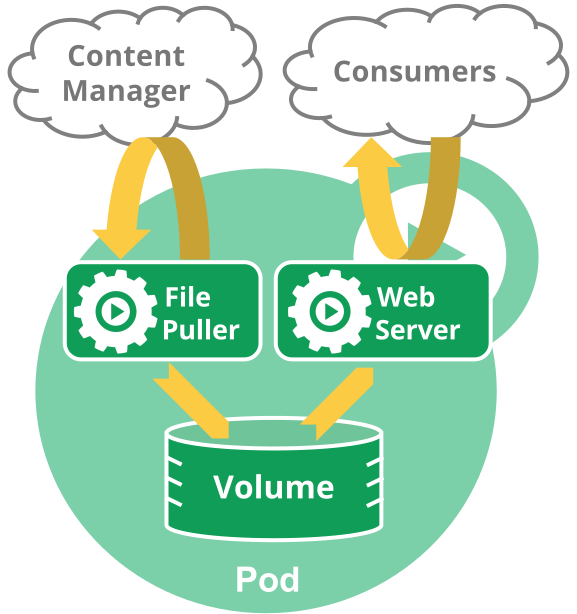
For example, you might have a container that
acts as a web server for files in a shared volume, and a separate
[sidecar container](/docs/concepts/workloads/pods/sidecar-containers/)
that updates those files from a remote source, as in the following diagram:
Some Pods have init containers
as well as app containers.
By default, init containers run and complete before the app containers are started.
You can also have [sidecar containers](/docs/concepts/workloads/pods/sidecar-containers/)
that provide auxiliary services to the main application Pod (for example: a service mesh).
FEATURE STATE:Kubernetes v1.33 [stable](enabled by default)
Enabled by default, the `SidecarContainers` [feature gate](/docs/reference/command-line-tools-reference/feature-gates/)
allows you to specify `restartPolicy: Always` for init containers.
Setting the `Always` restart policy ensures that the containers where you set it are
treated as _sidecars_ that are kept running during the entire lifetime of the Pod.
Containers that you explicitly define as sidecar containers
start up before the main application Pod and remain running until the Pod is
shut down.
## Container probes
A _probe_ is a diagnostic performed periodically by the kubelet on a container.
To perform a diagnostic, the kubelet can invoke different actions:
- `ExecAction` (performed with the help of the container runtime)
- `TCPSocketAction` (checked directly by the kubelet)
- `HTTPGetAction` (checked directly by the kubelet)
You can read more about [probes](/docs/concepts/workloads/pods/pod-lifecycle/#container-probes)
in the Pod Lifecycle documentation.
## What's next
* Learn about the [lifecycle of a Pod](/docs/concepts/workloads/pods/pod-lifecycle/).
* Read about [PodDisruptionBudget](/docs/concepts/workloads/pods/disruptions/)
and how you can use it to manage application availability during disruptions.
* Pod is a top-level resource in the Kubernetes REST API.
The
Pod
object definition describes the object in detail.
* [The Distributed System Toolkit: Patterns for Composite Containers](/blog/2015/06/the-distributed-system-toolkit-patterns/) explains common layouts for Pods with more than one container.
* Read about [Pod topology spread constraints](/docs/concepts/scheduling-eviction/topology-spread-constraints/)
* Read [Advanced Pod Configuration](/docs/concepts/workloads/pods/advanced-pod-config/) to learn the topic in detail.
That page covers aspects of Pod configuration beyond the essentials, including:
* PriorityClasses
* RuntimeClasses
* advanced ways to configure _scheduling_: the way that Kubernetes decides which node a Pod should run on.
To understand the context for why Kubernetes wraps a common Pod API in other resources
(such as StatefulSets or
Deployments),
you can read about the prior art, including:
* [Aurora](https://aurora.apache.org/documentation/latest/reference/configuration/#job-schema)
* [Borg](https://research.google/pubs/large-scale-cluster-management-at-google-with-borg/)
* [Marathon](https://github.com/d2iq-archive/marathon)
* [Omega](https://research.google/pubs/pub41684/)
* [Tupperware](https://engineering.fb.com/data-center-engineering/tupperware/).
---
Section pages:
- [Pod Lifecycle](/docs/concepts/workloads/pods/pod-lifecycle/)
- [Pod Conditions](/docs/concepts/workloads/pods/pod-condition/)
- [Init Containers](/docs/concepts/workloads/pods/init-containers/)
- [Sidecar Containers](/docs/concepts/workloads/pods/sidecar-containers/)
- [Ephemeral Containers](/docs/concepts/workloads/pods/ephemeral-containers/)
- [Liveness, Readiness, and Startup Probes](/docs/concepts/workloads/pods/probes/)
- [Disruptions](/docs/concepts/workloads/pods/disruptions/)
- [Pod Hostname](/docs/concepts/workloads/pods/pod-hostname/)
- [Pod Quality of Service Classes](/docs/concepts/workloads/pods/pod-qos/)
- [Scheduling Group](/docs/concepts/workloads/pods/scheduling-group/)
- [Static Pods](/docs/concepts/workloads/pods/static-pods/)
- [User Namespaces](/docs/concepts/workloads/pods/user-namespaces/)
- [Downward API](/docs/concepts/workloads/pods/downward-api/): There are two ways to expose Pod and container fields to a running container: environment variables, and as files that are populated by a special volume type. Together, these two ways of exposing Pod and container fields are called the downward API.
- [Advanced Pod Configuration](/docs/concepts/workloads/pods/advanced-pod-config/)