# Reviewing pull requests
LLMS index: [llms.txt](/llms.txt)
---
Anyone can review a documentation pull request. Visit the [pull requests](https://github.com/kubernetes/website/pulls)
section in the Kubernetes website repository to see open pull requests.
Reviewing documentation pull requests is a great way to introduce yourself to the Kubernetes
community. It helps you learn the code base and build trust with other contributors.
Before reviewing, it's a good idea to:
- Read the [content guide](/docs/contribute/style/content-guide/) and
[style guide](/docs/contribute/style/style-guide/) so you can leave informed comments.
- Understand the different
[roles and responsibilities](/docs/contribute/participate/roles-and-responsibilities/)
in the Kubernetes documentation community.
## Before you begin
Before you start a review:
- Read the [CNCF Code of Conduct](https://github.com/cncf/foundation/blob/main/code-of-conduct.md)
and ensure that you abide by it at all times.
- Be polite, considerate, and helpful.
- Comment on positive aspects of PRs as well as changes.
- Be empathetic and mindful of how your review may be received.
- Assume good intent and ask clarifying questions.
- Experienced contributors, consider pairing with new contributors whose work requires extensive changes.
## Review process
In general, review pull requests for content and style in English. Figure 1 outlines the steps for
the review process. The details for each step follow.
flowchart LR
subgraph fourth[Start review]
direction TB
S[ ] -.-
M[add comments] --> N[review changes]
N --> O[new contributors should choose Comment]
end
subgraph third[Select PR]
direction TB
T[ ] -.-
J[read description and comments]--> K[preview changes in Netlify preview build]
end
A[Review open PR list]--> B[Filter open PRs by label]
B --> third --> fourth
classDef grey fill:#dddddd,stroke:#ffffff,stroke-width:px,color:#000000, font-size:15px;
classDef white fill:#ffffff,stroke:#000,stroke-width:px,color:#000,font-weight:bold
classDef spacewhite fill:#ffffff,stroke:#fff,stroke-width:0px,color:#000
class A,B,J,K,M,N,O grey
class S,T spacewhite
class third,fourth white
Figure 1. Review process steps.
1. Go to [https://github.com/kubernetes/website/pulls](https://github.com/kubernetes/website/pulls).
You see a list of every open pull request against the Kubernetes website and docs.
2. Filter the open PRs using one or all of the following labels:
- `cncf-cla: yes` (Recommended): PRs submitted by contributors who have not signed the CLA
cannot be merged. See [Sign the CLA](/docs/contribute/new-content/#sign-the-cla)
for more information.
- `language/en` (Recommended): Filters for english language PRs only.
- `size/`: filters for PRs of a certain size. If you're new, start with smaller PRs.
Additionally, ensure the PR isn't marked as a work in progress. PRs using the `work in
progress` label are not ready for review yet.
3. Once you've selected a PR to review, understand the change by:
- Reading the PR description to understand the changes made, and read any linked issues
- Reading any comments by other reviewers
- Clicking the **Files changed** tab to see the files and lines changed
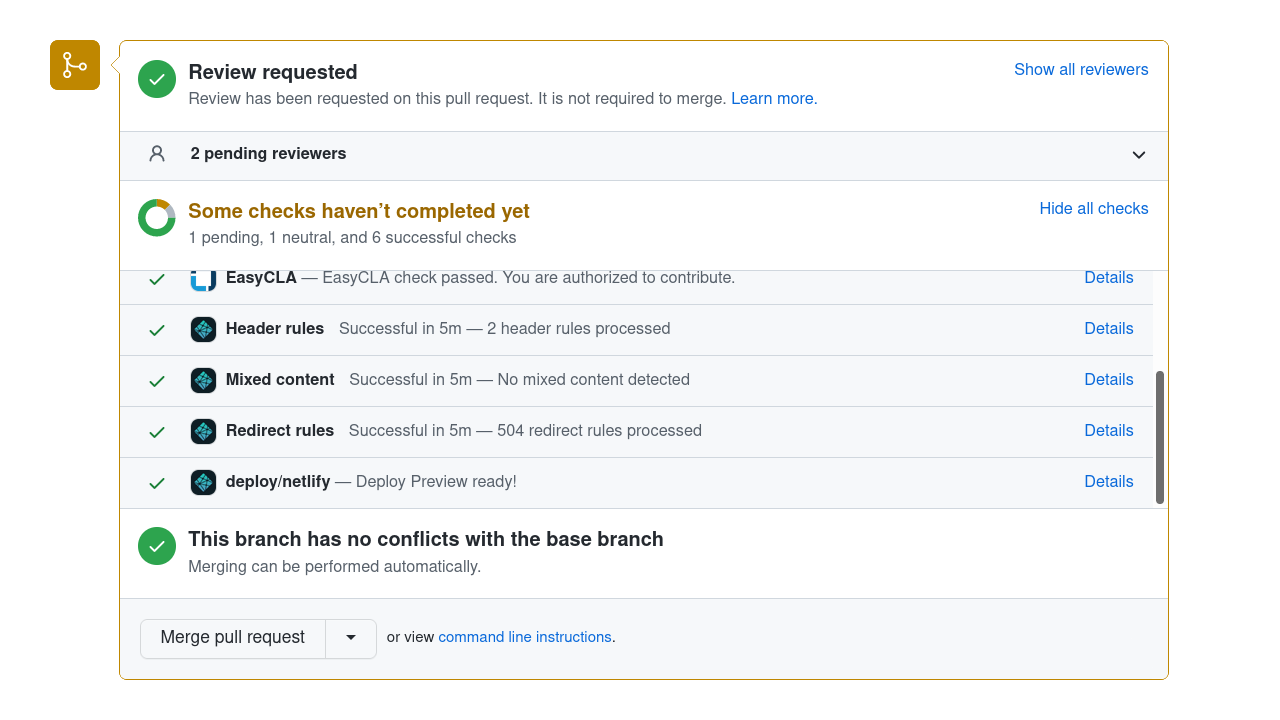
- Previewing the changes in the Netlify preview build by scrolling to the PR's build check
section at the bottom of the **Conversation** tab.
Here's a screenshot (this shows GitHub's desktop site; if you're reviewing
on a tablet or smartphone device, the GitHub web UI is slightly different):
To open the preview, click on the **Details** link of the **deploy/netlify** line in the
list of checks.
4. Go to the **Files changed** tab to start your review.
1. Click on the `+` symbol beside the line you want to comment on.
1. Fill in any comments you have about the line and click either **Add single comment**
(if you have only one comment to make) or **Start a review** (if you have multiple comments to make).
1. When finished, click **Review changes** at the top of the page. Here, you can add
a summary of your review (and leave some positive comments for the contributor!).
Please always use the "Comment"
- Avoid clicking the "Request changes" button when finishing your review.
If you want to block a PR from being merged before some further changes are made,
you can leave a "/hold" comment.
Mention why you are setting a hold, and optionally specify the conditions under
which the hold can be removed by you or other reviewers.
- Avoid clicking the "Approve" button when finishing your review.
Leaving a "/approve" comment is recommended most of the time.
## Reviewing checklist
When reviewing, use the following as a starting point.
### Language and grammar
- Are there any obvious errors in language or grammar? Is there a better way to phrase something?
- Focus on the language and grammar of the parts of the page that the author is changing.
Unless the author is clearly aiming to update the entire page, they have no obligation to
fix every issue on the page.
- When a PR updates an existing page, you should focus on reviewing the parts of
the page that are being updated. That changed content should be reviewed for technical
and editorial correctness.
If you find errors on the page that don't directly relate to what the PR author
is attempting to address, then it should be treated as a separate issue (check
that there isn't an existing issue about this first).
- Watch out for pull requests that _move_ content. If an author renames a page
or combines two pages, we (Kubernetes SIG Docs) usually avoid asking that author to fix every grammar or spelling nit
that we could spot within that moved content.
- Are there any complicated or archaic words which could be replaced with a simpler word?
- Are there any words, terms or phrases in use which could be replaced with a non-discriminatory alternative?
- Does the word choice and its capitalization follow the [style guide](/docs/contribute/style/style-guide/)?
- Are there long sentences which could be shorter or less complex?
- Are there any long paragraphs which might work better as a list or table?
### Content
- Does similar content exist elsewhere on the Kubernetes site?
- Does the content excessively link to off-site, individual vendor or non-open source documentation?
### Documentation
Some checks to consider:
- Did this PR change or remove a page title, slug/alias or anchor link? If so, are there broken
links as a result of this PR? Is there another option, like changing the page title without
changing the slug?
- Does the PR introduce a new page? If so:
- Is the page using the right [page content type](/docs/contribute/style/page-content-types/)
and associated Hugo shortcodes?
- Does the page appear correctly in the section's side navigation (or at all)?
- Should the page appear on the [Docs Home](/docs/home/) listing?
- Do the changes show up in the Netlify preview? Be particularly vigilant about lists, code
blocks, tables, notes and images.
### Website infrastructure
For changes involving the website framework (such as Hugo upgrades, Docsy theme updates),
Reviewers must ask the PR author to confirm the site builds without errors in production mode, or verify it themselves.
This is necessary because automated Netlify previews may not catch specific asset transformation
or path resolution errors that only trigger during a full production build.
Reviewers can verify the build using one of the following methods:
- **Container-based (recommended):** Ensures environment parity without needing Hugo installed locally.
Note:
The default container-serve target runs in development mode.
For a production-equivalent build, temporarily edit the Makefile and change
--environment development to --environment production in the container-serve target, then run:
make container-image
make container-serve
- **Local Hugo via Make:** Uses the existing Makefile target for a production build. Note that this performs a full build and is slower than serving the site.
```bash
make production-build
```
- **Direct Hugo command:** The fastest way to perform the production build without serving the site.
```bash
hugo --gc --minify --templateMetrics --environment production
```
#### Verify the output
A successful build will display a summary table:
```text
| EN | ZH-CN | JA | ...
---+------+-------+-----+
Pages | 2601 | 2148 | 747 | ...
Built in 95753 ms
Environment: "production"
```
If the build fails, you will see explicit ERROR logs;
a failure such as a shortcode or asset transformation might look like:
```text
ERROR render of "page" failed: "/src/layouts/shortcodes/cve-feed.html:3:14":
execute of template failed: template: shortcodes/cve-feed.html:3:14:
failed to transform "scss/main.scss" (text/x-scss): SCSS processing failed
```
Review the Netlify preview to see how the failure is rendered on the site.
If the production build fails, the PR must not be merged until the author addresses the
transformation or template errors.
### Blog
Early feedback on blog posts is welcome via a Google Doc or HackMD. Please request input early from the [#sig-docs-blog Slack channel](https://kubernetes.slack.com/archives/CJDHVD54J).
Before reviewing blog PRs, be familiar with the [blog guidelines](/docs/contribute/blog/guidelines/)
and with [submitting blog posts and case studies](/docs/contribute/new-content/blogs-case-studies/).
Make sure you also know about [evergreen](/docs/contribute/blog/#maintenance-evergreen) articles
and how to decide if an article is evergreen.
Blog articles may contain [direct quotes](https://en.wikipedia.org/wiki/Direct_discourse) and
[indirect speech](https://en.wikipedia.org/wiki/Indirect_speech). Avoid suggesting a rewording for
anything that is attributed to someone or part of a dialog that has happened - even if you think
the original speaker's grammar was not correct. For those cases, also, try to respect the article
author's suggested punctuation unless it is obviously wrong.
As a project, we only mark blog articles as maintained (`evergreen: true` in front matter) if the Kubernetes project
is happy to commit to maintaining them indefinitely.
Some blog articles absolutely merit this, and we always mark our release announcements evergreen. Check with other contributors if you are not sure how to review on this point.
The [content guide](/docs/contribute/style/content-guide/) applies unconditionally to blog articles and the PRs that add them. Bear in mind that some restrictions in the guide state that they are only relevant to documentation; those restrictions don't apply to blog articles.
Check if the Markdown source is using the right [page content type](/docs/contribute/style/page-content-types/) and / or `layout`.
### Other
Watch out for [trivial edits](https://www.kubernetes.dev/docs/guide/pull-requests/#trivial-edits);
if you see a change that you think is a trivial edit, please point out that policy
(it's still OK to accept the change if it is genuinely an improvement).
Encourage authors who are making whitespace fixes to do
so in the first commit of their PR, and then add other changes on top of that. This
makes both merges and reviews easier. Watch out especially for a trivial change that
happens in a single commit along with a large amount of whitespace cleanup
(and if you see that, encourage the author to fix it).
As a reviewer, if you identify small issues with a PR that aren't essential to the meaning,
such as typos or incorrect whitespace, prefix your comments with `nit:`.
This lets the author know that this part of your feedback is non-critical.
If you are considering a pull request for approval and all the remaining feedback is
marked as a nit, you can merge the PR anyway. In that case, it's often useful to open
an issue about the remaining nits. Consider whether you're able to meet the requirements
for marking that new issue as a [Good First Issue](https://www.kubernetes.dev/docs/guide/help-wanted/#good-first-issue); if you can, these are a good source.