# Pod 的生命周期

LLMS index: [llms.txt](/llms.txt)

---

<!--
title: Pod Lifecycle
content_type: concept
weight: 30
math: true
-->

<!-- overview -->

<!--
This page describes the lifecycle of a Pod. Pods follow a defined lifecycle, starting
in the `Pending` [phase](#pod-phase), moving through `Running` if at least one
of its primary containers starts OK, and then through either the `Succeeded` or
`Failed` phases depending on whether any container in the Pod terminated in failure.
-->
本页面讲述 Pod 的生命周期。
Pod 遵循预定义的生命周期，起始于 `Pending` [阶段](#pod-phase)，
如果至少其中有一个主要容器正常启动，则进入 `Running`，之后取决于 Pod
中是否有容器以失败状态结束而进入 `Succeeded` 或者 `Failed` 阶段。

<!--
Like individual application containers, Pods are considered to be relatively
ephemeral (rather than durable) entities. Pods are created, assigned a unique
ID ([UID](/docs/concepts/overview/working-with-objects/names/#uids)), and scheduled
to run on nodes where they remain until termination (according to restart policy) or
deletion.
If a <a class='glossary-tooltip' title='Kubernetes 中的工作机器称作节点。' data-bs-toggle='tooltip' data-bs-placement='top' href='/zh-cn/docs/concepts/architecture/nodes/' target='_blank' aria-label='节点（Node）'>节点（Node）</a> dies, the Pods running on (or scheduled
to run on) that node are [marked for deletion](#pod-garbage-collection). The control
plane marks the Pods for removal after a timeout period.
-->
和一个个独立的应用容器一样，Pod 也被认为是相对临时性（而不是长期存在）的实体。
Pod 会被创建、赋予一个唯一的
ID（[UID](/zh-cn/docs/concepts/overview/working-with-objects/names/#uids)），
并被调度到节点，并在终止（根据重启策略）或删除之前一直运行在该节点。
如果一个<a class='glossary-tooltip' title='Kubernetes 中的工作机器称作节点。' data-bs-toggle='tooltip' data-bs-placement='top' href='/zh-cn/docs/concepts/architecture/nodes/' target='_blank' aria-label='节点'>节点</a>死掉了，调度到该节点的
Pod 也被计划在给定超时期限结束后[删除](#pod-garbage-collection)。

<!-- body -->

<!--
## Pod lifetime

Whilst a Pod is running, the kubelet is able to restart containers to handle some
kind of faults. Within a Pod, Kubernetes tracks different container
[states](#container-states) and determines what action to take to make the Pod
healthy again.
-->
## Pod 生命期   {#pod-lifetime}

在 Pod 运行期间，`kubelet` 能够重启容器以处理一些失效场景。
在 Pod 内部，Kubernetes 跟踪不同容器的[状态](#container-states)并确定使
Pod 重新变得健康所需要采取的动作。

<!--
In the Kubernetes API, Pods have both a specification and an actual status. The
status for a Pod object consists of a set of [Pod conditions](#pod-conditions).
You can also inject [custom readiness information](#pod-readiness-gate) into the
condition data for a Pod, if that is useful to your application.
-->
在 Kubernetes API 中，Pod 包含规约部分和实际状态部分。
Pod 对象的状态包含了一组 [Pod 状况（Conditions）](#pod-conditions)。
如果应用需要的话，你也可以向其中注入[自定义的就绪态信息](#pod-readiness-gate)。

<!--
Pods are only [scheduled](/docs/concepts/scheduling-eviction/) once in their lifetime;
assigning a Pod to a specific node is called _binding_, and the process of selecting
which node to use is called _scheduling_.
Once a Pod has been scheduled and is bound to a node, Kubernetes tries
to run that Pod on the node. The Pod runs on that node until it stops, or until the Pod
is [terminated](#pod-termination); if Kubernetes isn't able to start the Pod on the selected
node (for example, if the node crashes before the Pod starts), then that particular Pod
never starts.
-->
Pod 在其生命周期中只会被[调度](/zh-cn/docs/concepts/scheduling-eviction/)一次。
将 Pod 分配到特定节点的过程称为**绑定**，而选择使用哪个节点的过程称为**调度**。
一旦 Pod 被调度并绑定到某个节点，Kubernetes 会尝试在该节点上运行 Pod。
Pod 会在该节点上运行，直到 Pod 停止或者被[终止](#pod-termination)；
如果 Kubernetes 无法在选定的节点上启动 Pod（例如，如果节点在 Pod 启动前崩溃），
那么特定的 Pod 将永远不会启动。

<!--
You can use [Pod Scheduling Readiness](/docs/concepts/scheduling-eviction/pod-scheduling-readiness/)
to delay scheduling for a Pod until all its _scheduling gates_ are removed. For example,
you might want to define a set of Pods but only trigger scheduling once all the Pods
have been created.
-->
你可以使用 [Pod 调度就绪态](/zh-cn/docs/concepts/scheduling-eviction/pod-scheduling-readiness/)来延迟
Pod 的调度，直到所有的**调度门控**都被移除。
例如，你可能想要定义一组 Pod，但只有在所有 Pod 都被创建完成后才会触发调度。

<!--
### Pods and fault recovery {#pod-fault-recovery}

If one of the containers in the Pod fails, then Kubernetes may try to restart that
specific container.
Read [How Pods handle problems with containers](#container-restarts) to learn more.
-->
### Pod 和故障恢复   {#pod-fault-recovery}

如果 Pod 中的某个容器失败，Kubernetes 可能会尝试重启特定的容器。
有关细节参阅 [Pod 如何处理容器问题](#container-restarts)。

<!--
Pods can however fail in a way that the cluster cannot recover from, and in that case
Kubernetes does not attempt to heal the Pod further; instead, Kubernetes deletes the
Pod and relies on other components to provide automatic healing.

If a Pod is scheduled to a <a class='glossary-tooltip' title='Kubernetes 中的工作机器称作节点。' data-bs-toggle='tooltip' data-bs-placement='top' href='/zh-cn/docs/concepts/architecture/nodes/' target='_blank' aria-label='node'>node</a> and that
node then fails, the Pod is treated as unhealthy and Kubernetes eventually deletes the Pod.
A Pod won't survive an <a class='glossary-tooltip' title='终止节点上一个或多个 Pod 的过程。' data-bs-toggle='tooltip' data-bs-placement='top' href='/zh-cn/docs/concepts/scheduling-eviction/' target='_blank' aria-label='eviction'>eviction</a> due to
a lack of resources or Node maintenance.
-->
然而，Pod 也可能以集群无法恢复的方式失败，在这种情况下，Kubernetes 不会进一步尝试修复 Pod；
相反，Kubernetes 会删除 Pod 并依赖其他组件提供自动修复。

如果 Pod 被调度到某个<a class='glossary-tooltip' title='Kubernetes 中的工作机器称作节点。' data-bs-toggle='tooltip' data-bs-placement='top' href='/zh-cn/docs/concepts/architecture/nodes/' target='_blank' aria-label='节点'>节点</a>而该节点之后失效，
Pod 会被视为不健康，最终 Kubernetes 会删除 Pod。
Pod 无法在因节点资源耗尽或者节点维护而被<a class='glossary-tooltip' title='终止节点上一个或多个 Pod 的过程。' data-bs-toggle='tooltip' data-bs-placement='top' href='/zh-cn/docs/concepts/scheduling-eviction/' target='_blank' aria-label='驱逐'>驱逐</a>期间继续存活。

<!--
Kubernetes uses a higher-level abstraction, called a
<a class='glossary-tooltip' title='控制器通过 API 服务器监控集群的公共状态，并致力于将当前状态转变为期望的状态。' data-bs-toggle='tooltip' data-bs-placement='top' href='/zh-cn/docs/concepts/architecture/controller/' target='_blank' aria-label='controller'>controller</a>, that handles the work of
managing the relatively disposable Pod instances.
-->
Kubernetes 使用一种高级抽象来管理这些相对而言可随时丢弃的 Pod 实例，
称作<a class='glossary-tooltip' title='控制器通过 API 服务器监控集群的公共状态，并致力于将当前状态转变为期望的状态。' data-bs-toggle='tooltip' data-bs-placement='top' href='/zh-cn/docs/concepts/architecture/controller/' target='_blank' aria-label='控制器'>控制器</a>。

<!--
A given Pod (as defined by a UID) is never "rescheduled" to a different node; instead,
that Pod can be replaced by a new, near-identical Pod. If you make a replacement Pod, it can
even have same name (as in `.metadata.name`) that the old Pod had, but the replacement
would have a different `.metadata.uid` from the old Pod.

Kubernetes does not guarantee that a replacement for an existing Pod would be scheduled to
the same node as the old Pod that was being replaced.
-->
任何给定的 Pod （由 UID 定义）从不会被“重新调度（rescheduled）”到不同的节点；
相反，这一 Pod 可以被一个新的、几乎完全相同的 Pod 替换掉。
如果你创建一个替换 Pod，它甚至可以拥有与旧 Pod 相同的名称（如 `.metadata.name`），
但替换 Pod 将具有与旧 Pod 不同的 `.metadata.uid`。

Kubernetes 不保证现有 Pod 的替换 Pod 会被调度到与被替换的旧 Pod 相同的节点。

<!--
### Associated lifetimes

When something is said to have the same lifetime as a Pod, such as a
<a class='glossary-tooltip' title='包含可被 Pod 中容器访问的数据的目录。' data-bs-toggle='tooltip' data-bs-placement='top' href='/zh-cn/docs/concepts/storage/volumes/' target='_blank' aria-label='volume'>volume</a>,
that means that the thing exists as long as that specific Pod (with that exact UID)
exists. If that Pod is deleted for any reason, and even if an identical replacement
is created, the related thing (a volume, in this example) is also destroyed and
created anew.
-->
### 关联的生命期    {#associated-lifetimes}

如果某物声称其生命期与某 Pod 相同，例如存储<a class='glossary-tooltip' title='包含可被 Pod 中容器访问的数据的目录。' data-bs-toggle='tooltip' data-bs-placement='top' href='/zh-cn/docs/concepts/storage/volumes/' target='_blank' aria-label='卷'>卷</a>，
这就意味着该对象在此 Pod （UID 亦相同）存在期间也一直存在。
如果 Pod 因为任何原因被删除，甚至某完全相同的替代 Pod 被创建时，
这个相关的对象（例如这里的卷）也会被删除并重建。

<!--


<figure class="diagram-medium ">
    <img src="/images/docs/pod.svg"
         alt="A multi-container Pod that contains a file puller sidecar and a web server. The Pod uses an ephemeral emptyDir volume for shared storage between the containers."/> <figcaption>
            <h4>Figure 1.</h4><p>A multi-container Pod that contains a file puller <a href="/zh-cn/docs/concepts/workloads/pods/sidecar-containers/">sidecar</a> and a web server. The Pod uses an <a href="/zh-cn/docs/concepts/storage/volumes/#emptydir">ephemeral <code>emptyDir</code> volume</a> for shared storage between the containers.</p>
        </figcaption>
</figure>
-->


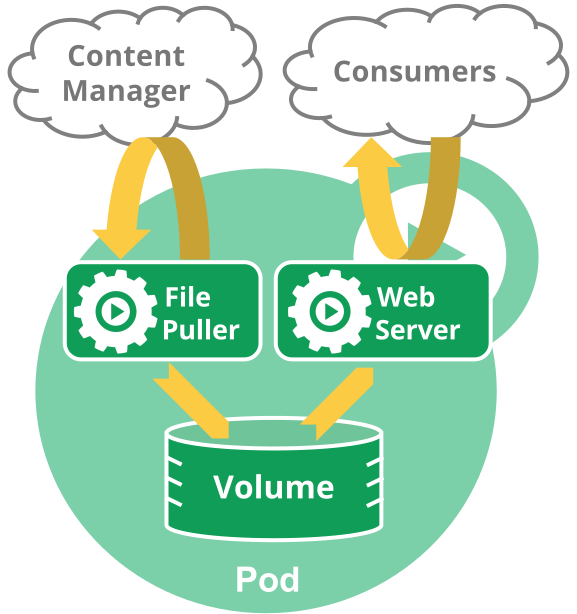
<figure class="diagram-medium ">
    <img src="/images/docs/pod.svg"
         alt="一个包含文件拉取程序 Sidecar（边车） 和 Web 服务器的多容器 Pod。此 Pod 使用临时 emptyDir 卷作为容器之间的共享存储。"/> <figcaption>
            <h4>图 1</h4><p>一个包含文件拉取程序 <a href="/zh-cn/docs/concepts/workloads/pods/sidecar-containers/">Sidecar（边车）</a> 和 Web 服务器的多容器 Pod。此 Pod 使用<a href="/zh-cn/docs/concepts/storage/volumes/#emptydir">临时 <code>emptyDir</code> 卷</a>作为容器之间的共享存储。</p>
        </figcaption>
</figure>


<!--
## Pod phase

A Pod's `status` field is a
[PodStatus](/docs/reference/generated/kubernetes-api/v1.36/#podstatus-v1-core)
object, which has a `phase` field.

The phase of a Pod is a simple, high-level summary of where the Pod is in its
lifecycle. The phase is not intended to be a comprehensive rollup of observations
of container or Pod state, nor is it intended to be a comprehensive state machine.
-->
## Pod 阶段     {#pod-phase}

Pod 的 `status` 字段是一个
[PodStatus](/docs/reference/generated/kubernetes-api/v1.36/#podstatus-v1-core)
对象，其中包含一个 `phase` 字段。

Pod 的阶段（Phase）是 Pod 在其生命周期中所处位置的简单宏观概述。
该阶段并不是对容器或 Pod 状态的综合汇总，也不是为了成为完整的状态机。

<!--
The number and meanings of Pod phase values are tightly guarded.
Other than what is documented here, nothing should be assumed about Pods that
have a given `phase` value.

Here are the possible values for `phase`:
-->
Pod 阶段的数量和含义是严格定义的。
除了本文档中列举的内容外，不应该再假定 Pod 有其他的 `phase` 值。

下面是 `phase` 可能的值：

<!--
Value       | Description
:-----------|:-----------
`Pending`   | The Pod has been accepted by the Kubernetes cluster, but one or more of the containers has not been set up and made ready to run. This includes time a Pod spends waiting to be scheduled as well as the time spent downloading container images over the network.
`Running`   | The Pod has been bound to a node, and all of the containers have been created. At least one container is still running, or is in the process of starting or restarting.
`Succeeded` | All containers in the Pod have terminated in success, and will not be restarted.
`Failed`    | All containers in the Pod have terminated, and at least one container has terminated in failure. That is, the container either exited with non-zero status or was terminated by the system, and is not set for automatic restarting.
`Unknown`   | For some reason the state of the Pod could not be obtained. This phase typically occurs due to an error in communicating with the node where the Pod should be running.
-->
取值 | 描述
:-----|:-----------
`Pending`（悬决）| Pod 已被 Kubernetes 系统接受，但有一个或者多个容器尚未创建亦未运行。此阶段包括等待 Pod 被调度的时间和通过网络下载镜像的时间。
`Running`（运行中） | Pod 已经绑定到了某个节点，Pod 中所有的容器都已被创建。至少有一个容器仍在运行，或者正处于启动或重启状态。
`Succeeded`（成功） | Pod 中的所有容器都已成功结束，并且不会再重启。
`Failed`（失败） | Pod 中的所有容器都已终止，并且至少有一个容器是因为失败终止。也就是说，容器以非 0 状态退出或者被系统终止，且未被设置为自动重启。
`Unknown`（未知） | 因为某些原因无法取得 Pod 的状态。这种情况通常是因为与 Pod 所在主机通信失败。


<div class="alert alert-info" role="note"><h4 class="alert-heading">说明：</h4><!--
When a pod is failing to start repeatedly, `CrashLoopBackOff` may appear in the `Status` field of some kubectl commands.
Similarly, when a pod is being deleted, `Terminating` may appear in the `Status` field of some kubectl commands.

Make sure not to confuse _Status_, a kubectl display field for user intuition, with the pod's `phase`.
Pod phase is an explicit part of the Kubernetes data model and of the
[Pod API](/docs/reference/kubernetes-api/workload-resources/pod-v1/).
-->
<p>当 Pod 反复启动失败时，某些 kubectl 命令的 <code>Status</code> 字段中可能会出现 <code>CrashLoopBackOff</code>。
同样，当 Pod 被删除时，某些 kubectl 命令的 <code>Status</code> 字段中可能会出现 <code>Terminating</code>。</p>
<p>确保不要将 <strong>Status</strong>（kubectl 用于用户直觉的显示字段）与 Pod 的 <code>phase</code> 混淆。
Pod 阶段（phase）是 Kubernetes 数据模型和
<a href="/zh-cn/docs/reference/kubernetes-api/workload-resources/pod-v1/">Pod API</a>
的一个明确的部分。</p>
<div class="highlight"><pre tabindex="0" class="chroma"><code class="language-console" data-lang="console"><span class="line"><span class="cl"><span class="go">NAMESPACE               NAME               READY   STATUS             RESTARTS   AGE
</span></span></span><span class="line"><span class="cl"><span class="go">alessandras-namespace   alessandras-pod    0/1     CrashLoopBackOff   200        2d9h
</span></span></span></code></pre></div><!--
A Pod is granted a term to terminate gracefully, which defaults to 30 seconds.
You can use the flag `--force` to [terminate a Pod by force](/docs/concepts/workloads/pods/pod-lifecycle/#pod-termination-forced).
-->
<p>Pod 被赋予一个可以体面终止的期限，默认为 30 秒。
你可以使用 <code>--force</code> 参数来<a href="/zh-cn/docs/concepts/workloads/pods/pod-lifecycle/#pod-termination-forced">强制终止 Pod</a>。</p>
</div>


<!--
Since Kubernetes 1.27, the kubelet transitions deleted Pods, except for
[static Pods](/docs/tasks/configure-pod-container/static-pod/) and
[force-deleted Pods](/docs/concepts/workloads/pods/pod-lifecycle/#pod-termination-forced)
without a finalizer, to a terminal phase (`Failed` or `Succeeded` depending on
the exit statuses of the pod containers) before their deletion from the API server.
-->
从 Kubernetes 1.27 开始，除了[静态 Pod](/zh-cn/docs/tasks/configure-pod-container/static-pod/)
和没有 Finalizer 的[强制终止 Pod](/zh-cn/docs/concepts/workloads/pods/pod-lifecycle/#pod-termination-forced)
之外，`kubelet` 会将已删除的 Pod 转换到终止阶段
（`Failed` 或 `Succeeded` 具体取决于 Pod 容器的退出状态），然后再从 API 服务器中删除。

<!--
If a node dies or is disconnected from the rest of the cluster, Kubernetes
applies a policy for setting the `phase` of all Pods on the lost node to Failed.
-->
如果某节点死掉或者与集群中其他节点失联，Kubernetes
会实施一种策略，将失去的节点上运行的所有 Pod 的 `phase` 设置为 `Failed`。

<!--
## Container states

As well as the [phase](#pod-phase) of the Pod overall, Kubernetes tracks the state of
each container inside a Pod. You can use
[container lifecycle hooks](/docs/concepts/containers/container-lifecycle-hooks/) to
trigger events to run at certain points in a container's lifecycle.

Once the <a class='glossary-tooltip' title='控制平面组件，负责监视新创建的、未指定运行节点的 Pod，选择节点让 Pod 在上面运行。' data-bs-toggle='tooltip' data-bs-placement='top' href='/zh-cn/docs/reference/command-line-tools-reference/kube-scheduler/' target='_blank' aria-label='scheduler'>scheduler</a>
assigns a Pod to a Node, the kubelet starts creating containers for that Pod
using a <a class='glossary-tooltip' title='容器运行时是负责运行容器的软件。' data-bs-toggle='tooltip' data-bs-placement='top' href='/zh-cn/docs/setup/production-environment/container-runtimes' target='_blank' aria-label='container runtime'>container runtime</a>.
There are three possible container states: `Waiting`, `Running`, and `Terminated`.
-->
## 容器状态  {#container-states}

Kubernetes 会跟踪 Pod 中每个容器的状态，就像它跟踪 Pod 总体上的[阶段](#pod-phase)一样。
你可以使用[容器生命周期回调](/zh-cn/docs/concepts/containers/container-lifecycle-hooks/)
来在容器生命周期中的特定时间点触发事件。

一旦<a class='glossary-tooltip' title='控制平面组件，负责监视新创建的、未指定运行节点的 Pod，选择节点让 Pod 在上面运行。' data-bs-toggle='tooltip' data-bs-placement='top' href='/zh-cn/docs/reference/command-line-tools-reference/kube-scheduler/' target='_blank' aria-label='调度器'>调度器</a>将 Pod
分派给某个节点，`kubelet`
就通过<a class='glossary-tooltip' title='容器运行时是负责运行容器的软件。' data-bs-toggle='tooltip' data-bs-placement='top' href='/zh-cn/docs/setup/production-environment/container-runtimes' target='_blank' aria-label='容器运行时'>容器运行时</a>开始为
Pod 创建容器。容器的状态有三种：`Waiting`（等待）、`Running`（运行中）和
`Terminated`（已终止）。

<!--
To check the state of a Pod's containers, you can use
`kubectl describe pod <name-of-pod>`. The output shows the state for each container
within that Pod.

Each state has a specific meaning:
-->
要检查 Pod 中容器的状态，你可以使用 `kubectl describe pod <pod 名称>`。
其输出中包含 Pod 中每个容器的状态。

每种状态都有特定的含义：

<!--
### `Waiting` {#container-state-waiting}

If a container is not in either the `Running` or `Terminated` state, it is `Waiting`.
A container in the `Waiting` state is still running the operations it requires in
order to complete start up: for example, pulling the container image from a container
image registry, or applying <a class='glossary-tooltip' title='Secret 用于存储敏感信息，如密码、 OAuth 令牌和 SSH 密钥。' data-bs-toggle='tooltip' data-bs-placement='top' href='/zh-cn/docs/concepts/configuration/secret/' target='_blank' aria-label='Secret'>Secret</a>
data.
When you use `kubectl` to query a Pod with a container that is `Waiting`, you also see
a Reason field to summarize why the container is in that state.
-->
### `Waiting`（等待）  {#container-state-waiting}

如果容器并不处在 `Running` 或 `Terminated` 状态之一，它就处在 `Waiting` 状态。
处于 `Waiting` 状态的容器仍在运行它完成启动所需要的操作：例如，
从某个容器镜像仓库拉取容器镜像，或者向容器应用 <a class='glossary-tooltip' title='Secret 用于存储敏感信息，如密码、 OAuth 令牌和 SSH 密钥。' data-bs-toggle='tooltip' data-bs-placement='top' href='/zh-cn/docs/concepts/configuration/secret/' target='_blank' aria-label='Secret'>Secret</a>
数据等等。
当你使用 `kubectl` 来查询包含 `Waiting` 状态的容器的 Pod 时，你也会看到一个
Reason 字段，其中给出了容器处于等待状态的原因。

<!--
### `Running` {#container-state-running}

The `Running` status indicates that a container is executing without issues. If there
was a `postStart` hook configured, it has already executed and finished. When you use
`kubectl` to query a Pod with a container that is `Running`, you also see information
about when the container entered the `Running` state.
-->
### `Running`（运行中）     {#container-state-running}

`Running` 状态表明容器正在执行状态并且没有问题发生。
如果配置了 `postStart` 回调，那么该回调已经执行且已完成。
如果你使用 `kubectl` 来查询包含 `Running` 状态的容器的 Pod 时，
你也会看到关于容器进入 `Running` 状态的信息。

<!--
### `Terminated` {#container-state-terminated}

A container in the `Terminated` state began execution and then either ran to
completion or failed for some reason. When you use `kubectl` to query a Pod with
a container that is `Terminated`, you see a reason, an exit code, and the start and
finish time for that container's period of execution.

If a container has a `preStop` hook configured, this hook runs before the container enters
the `Terminated` state.
-->
### `Terminated`（已终止）   {#container-state-terminated}

处于 `Terminated` 状态的容器开始执行后，或者运行至正常结束或者因为某些原因失败。
如果你使用 `kubectl` 来查询包含 `Terminated` 状态的容器的 Pod 时，
你会看到容器进入此状态的原因、退出代码以及容器执行期间的起止时间。

如果容器配置了 `preStop` 回调，则该回调会在容器进入 `Terminated`
状态之前执行。

<!--
## How Pods handle problems with containers {#container-restarts}

Kubernetes manages container failures within Pods using a [`restartPolicy`](#restart-policy) defined
in the Pod `spec`. This policy determines how Kubernetes reacts to containers exiting due to errors
or other reasons, which falls in the following sequence:
-->
## Pod 如何处理容器问题 {#container-restarts}

Kubernetes 通过在 Pod `spec` 中定义的 [`restartPolicy`](#restart-policy) 管理 Pod 内容器出现的失效。
该策略决定了 Kubernetes 如何对由于错误或其他原因而退出的容器做出反应，其顺序如下：

<!--
1. **Initial crash**: Kubernetes attempts an immediate restart based on the Pod `restartPolicy`.
1. **Repeated crashes**: After the initial crash Kubernetes applies an exponential
   backoff delay for subsequent restarts, described in [`restartPolicy`](#restart-policy).
   This prevents rapid, repeated restart attempts from overloading the system.
1. **CrashLoopBackOff state**: This indicates that the backoff delay mechanism is currently
   in effect for a given container that is in a crash loop, failing and restarting repeatedly.
1. **Backoff reset**: If a container runs successfully for a certain duration
   (e.g., 10 minutes), Kubernetes resets the backoff delay, treating any new crash
   as the first one.
-->
1. **最初的崩溃**：Kubernetes 尝试根据 Pod 的 `restartPolicy` 立即重新启动。
1. **反复的崩溃**：在最初的崩溃之后，Kubernetes 对于后续重新启动的容器采用指数级回退延迟机制，
   如 [`restartPolicy`](#restart-policy) 中所述。
   这一机制可以防止快速、重复的重新启动尝试导致系统过载。
1. **CrashLoopBackOff 状态**：这一状态表明，对于一个给定的、处于崩溃循环、反复失效并重启的容器，
   回退延迟机制目前正在生效。
1. **回退重置**：如果容器成功运行了一定时间（如 10 分钟），
  Kubernetes 会重置回退延迟机制，将新的崩溃视为第一次崩溃。

<!--
In practice, a `CrashLoopBackOff` is a condition or event that might be seen as output
from the `kubectl` command, while describing or listing Pods, when a container in the Pod
fails to start properly and then continually tries and fails in a loop.
-->
在实际部署中，`CrashLoopBackOff` 是在描述或列出 Pod 时从 `kubectl` 命令输出的一种状况或事件。
当 Pod 中的容器无法正常启动，并反复进入尝试与失败的循环时就会出现。

<!--
In other words, when a container enters the crash loop, Kubernetes applies the
exponential backoff delay mentioned in the [Container restart policy](#restart-policy).
This mechanism prevents a faulty container from overwhelming the system with continuous
failed start attempts.
-->
换句话说，当容器进入崩溃循环时，Kubernetes 会应用[容器重启策略](#restart-policy)
中提到的指数级回退延迟机制。这种机制可以防止有问题的容器因不断进行启动失败尝试而导致系统不堪重负。

<!--
The `CrashLoopBackOff` can be caused by issues like the following:

* Application errors that cause the container to exit.
* Configuration errors, such as incorrect environment variables or missing
  configuration files.
* Resource constraints, where the container might not have enough memory or CPU
  to start properly.
* Health checks failing if the application doesn't start serving within the
  expected time.
* Container liveness probes or startup probes returning a `Failure` result
  as mentioned in the [probes section](#container-probes).
-->
下列问题可以导致 `CrashLoopBackOff`：

* 应用程序错误导致的容器退出。
* 配置错误，如环境变量不正确或配置文件丢失。
* 资源限制，容器可能没有足够的内存或 CPU 正常启动。
* 如果应用程序没有在预期时间内启动服务，健康检查就会失败。
* 容器的存活探针或者启动探针返回 `失败` 结果，如[探针部分](#container-probes)所述。

<!--
To investigate the root cause of a `CrashLoopBackOff` issue, a user can:

1. **Check logs**: Use `kubectl logs <name-of-pod>` to check the logs of the container.
   This is often the most direct way to diagnose the issue causing the crashes.
1. **Inspect events**: Use `kubectl describe pod <name-of-pod>` to see events
   for the Pod, which can provide hints about configuration or resource issues.
1. **Review configuration**: Ensure that the Pod configuration, including
   environment variables and mounted volumes, is correct and that all required
   external resources are available.
1. **Check resource limits**: Make sure that the container has enough CPU
   and memory allocated. Sometimes, increasing the resources in the Pod definition
   can resolve the issue.
1. **Debug application**: There might exist bugs or misconfigurations in the
   application code. Running this container image locally or in a development
   environment can help diagnose application specific issues.
-->
要调查 `CrashLoopBackOff` 问题的根本原因，用户可以：

1. **检查日志**：使用 `kubectl logs <pod名称>` 检查容器的日志。
   这通常是诊断导致崩溃的问题的最直接方法。
1. **检查事件**：使用 `kubectl describe pod <pod名称>` 查看 Pod 的事件，
   这可以提供有关配置或资源问题的提示。
1. **审查配置**：确保 Pod 配置正确无误，包括环境变量和挂载卷，并且所有必需的外部资源都可用。
1. **检查资源限制**： 确保容器被分配了足够的 CPU 和内存。有时，增加 Pod 定义中的资源可以解决问题。
1. **调试应用程序**：应用程序代码中可能存在错误或配置不当。
   在本地或开发环境中运行此容器镜像有助于诊断应用程序的特定问题。

<!--
### Container restarts {#restart-policy}

When a container in your Pod stops, or experiences failure, Kubernetes can restart it.
A restart isn't always appropriate; for example,
<a class='glossary-tooltip' title='应用容器运行前必须先运行完成的一个或多个 Init 容器（Init Container）。' data-bs-toggle='tooltip' data-bs-placement='top' href='/zh-cn/docs/concepts/workloads/pods/init-containers/' target='_blank' aria-label='init containers'>init containers</a> run only once (if successful),
during Pod startup.
You can configure restarts as a policy that applies to all Pods, or using container-level configuration (for example: when you define a
<a class='glossary-tooltip' title='在 Pod 的整个生命期内保持运行的辅助容器。' data-bs-toggle='tooltip' data-bs-placement='top' href='/zh-cn/docs/concepts/workloads/pods/sidecar-containers/' target='_blank' aria-label='sidecar container'>sidecar container</a>) or define container-level override.
-->
### 容器重启   {#restart-policy}

当 Pod 中的某个容器停止或发生故障时，Kubernetes 可以重新启动此容器。但重启并不总是合适的；例如，
<a class='glossary-tooltip' title='应用容器运行前必须先运行完成的一个或多个 Init 容器（Init Container）。' data-bs-toggle='tooltip' data-bs-placement='top' href='/zh-cn/docs/concepts/workloads/pods/init-containers/' target='_blank' aria-label='Init 容器'>Init 容器</a>只在 Pod 启动期间运行一次（如果成功）。
你可以将重启配置为适用于所有 Pod 的策略，或者使用容器级别的配置（例如：
在你定义<a class='glossary-tooltip' title='在 Pod 的整个生命期内保持运行的辅助容器。' data-bs-toggle='tooltip' data-bs-placement='top' href='/zh-cn/docs/concepts/workloads/pods/sidecar-containers/' target='_blank' aria-label='边车容器'>边车容器</a>或定义容器级别重载时）。

<!--
#### Container restarts and resilience {#container-restart-resilience}

The Kubernetes project recommends following cloud-native principles, including resilient
design that accounts for unannounced or arbitrary restarts. You can achieve this either
by failing the Pod and relying on automatic
[replacement](/docs/concepts/workloads/controllers/), or you can design for container-level resilience.
Either approach helps to ensure that your overall workload remains available despite
partial failure.
-->
#### 容器重启与弹性   {#container-restart-resilience}

Kubernetes 项目建议遵循云原生原则，包括能够应对未预告或随意重启的弹性设计。
你可以通过让 Pod 失败并依赖自动[替换](/zh-cn/docs/concepts/workloads/controllers/)，
或者通过容器级别的弹性设计来实现。
无论哪种方式，都有助于确保即使在部分故障的情况下，你的整体工作负载依然保持可用。

<!--
#### Pod-level container restart policy

The `spec` of a Pod has a `restartPolicy` field with possible values Always, OnFailure,
and Never. The default value is Always.

The `restartPolicy` applies to <a class='glossary-tooltip' title='用于运行部分工作负载的容器。与 Init 容器比较而言。' data-bs-toggle='tooltip' data-bs-placement='top' href='/zh-cn/docs/reference/glossary/?all=true#term-app-container' target='_blank' aria-label='app containers'>app containers</a>
in the Pod and to regular [init containers](/docs/concepts/workloads/pods/init-containers/).
[Sidecar containers](/docs/concepts/workloads/pods/sidecar-containers/)
ignore the Pod-level `restartPolicy` field: in Kubernetes, a sidecar is defined as an
entry inside `initContainers` that has its container-level `restartPolicy` set to `Always`.
For init containers that exit with an error, the kubelet restarts the init container if
the Pod level `restartPolicy` is either `OnFailure` or `Always`.

* `Always`: Automatically restarts the container after any termination.
* `OnFailure`: Only restarts the container if it exits with an error (non-zero exit status).
* `Never`: Does not automatically restart the terminated container.
-->
### Pod 级别容器重启策略

Pod 的 `spec` 中包含一个 `restartPolicy` 字段，其可能取值包括
Always、OnFailure 和 Never。默认值是 Always。

`restartPolicy` 应用于 Pod
中的<a class='glossary-tooltip' title='用于运行部分工作负载的容器。与 Init 容器比较而言。' data-bs-toggle='tooltip' data-bs-placement='top' href='/zh-cn/docs/reference/glossary/?all=true#term-app-container' target='_blank' aria-label='应用容器'>应用容器</a>和常规的
[Init 容器](/zh-cn/docs/concepts/workloads/pods/init-containers/)。
[Sidecar 容器](/zh-cn/docs/concepts/workloads/pods/sidecar-containers/)忽略
Pod 级别的 `restartPolicy` 字段：在 Kubernetes 中，Sidecar 被定义为
`initContainers` 内的一个条目，其容器级别的 `restartPolicy` 被设置为 `Always`。
对于因错误而退出的 Init 容器，如果 Pod 级别 `restartPolicy` 为 `OnFailure` 或 `Always`，
则 kubelet 会重新启动 Init 容器。

* `Always`：只要容器终止就自动重启容器。
* `OnFailure`：只有在容器错误退出（退出状态非零）时才重新启动容器。
* `Never`：不会自动重启已终止的容器。

<!--
##### Restart behavior comparison

The following table shows how containers behave under different restart policies and exit codes:

| Exit Code | `restartPolicy: Always` | `restartPolicy: OnFailure` | `restartPolicy: Never` | Sidecar Containers |
|-----------|-------------------------|---------------------------|------------------------|-------------------|
| 0 (Success) | Restarts | Does not restart | Does not restart | Always restarts |
| Non-zero (Failure) | Restarts | Restarts | Does not restart | Always restarts |
-->
##### 重启行为比较

下表显示了在不同的重启策略和退出代码下容器的行为：

| 退出代码 | `restartPolicy: Always` | `restartPolicy: OnFailure` | `restartPolicy: Never` | 边车容器 |
|-----------|-------------------------|---------------------------|------------------------|---------------|
| 0 （成功） | 重启 | 不重启 | 不重启 | 总是重启 |
| 非零 （失败） | 重启 | 重启 | 不重启 | 总是重启 |


<div class="alert alert-info" role="note"><h4 class="alert-heading">说明：</h4><!--
The restart behavior is particularly important when choosing between Deployments and Jobs:
- **Deployments** typically use `restartPolicy: Always` (the only allowed value) to keep applications running continuously
- **Jobs** commonly use `restartPolicy: OnFailure` or `restartPolicy: Never` to handle batch processing tasks appropriately
- **Sidecar containers** are init containers that always restart regardless of the Pod's `restartPolicy` because they have their own container-level `restartPolicy: Always`
-->
<p>在选择 Deployment 还是 Job 时，重启行为尤为重要：</p>
<ul>
<li><strong>Deployment</strong> 通常使用 <code>restartPolicy: Always</code>（唯一允许的值）来保持应用程序持续运行。</li>
<li><strong>Job</strong> 通常使用 <code>restartPolicy: OnFailure</code> 或 <code>restartPolicy: Never</code> 来妥善处理批处理作业。</li>
<li><strong>边车容器</strong>是初始化容器，无论 Pod 的 <code>restartPolicy</code> 设置如何，
它们都会始终重启，因为它们拥有自己的容器级 <code>restartPolicy: Always</code> 设置。</li>
</ul></div>


<!--
##### Example scenarios

Here are concrete examples demonstrating the different restart behaviors:

**Example 1: Web server with `restartPolicy: Always` (typical for Deployments)**
```yaml
apiVersion: v1
kind: Pod
metadata:
  name: web-server
spec:
  restartPolicy: Always  # Container restarts regardless of exit code
  containers:
  - name: nginx
    image: nginx:1.14.2
    # If this container crashes or exits for any reason, it will be restarted
```
-->
##### 示例场景

以下是一些具体示例，演示了不同的重启行为：

**示例 1：Web 服务器，使用 `restartPolicy: Always`（通常用于 Deployment）**

```yaml
apiVersion: v1
kind: Pod
metadata:
  name: web-server
spec:
  restartPolicy: Always  # 无论退出代码如何，容器都会重启
  containers:
  - name: nginx
    image: nginx:1.14.2
    # 如果此容器因任何原因崩溃或退出，它将被重新启动
```

<!--
**Example 2: Batch job with `restartPolicy: OnFailure`**
```yaml
apiVersion: batch/v1
kind: Job
metadata:
  name: data-processor
spec:
  template:
    spec:
      restartPolicy: OnFailure  # Only restart on non-zero exit codes
      containers:
      - name: processor
        image: busybox:1.28
        command: ['sh', '-c', 'echo "Processing data..."; exit 0']
        # Exit code 0: Job completes successfully, no restart
        # Exit code 1+: Container restarts to retry the task
```
-->
**示例 2：使用 `restartPolicy: OnFailure` 的批处理作业**

```yaml
apiVersion: batch/v1
kind: Job
metadata:
  name: data-processor
spec:
  template:
    spec:
      restartPolicy: OnFailure  # 仅当退出代码非零时才重新启动
      containers:
      - name: processor
        image: busybox:1.28
        command: ['sh', '-c', 'echo "Processing data..."; exit 0']
        # 退出代码 0：作业成功完成，无需重启
        # 退出代码 1+：容器重启以重试作业
```

<!--
**Example 3: One-time task with `restartPolicy: Never`**
```yaml
apiVersion: v1
kind: Pod
metadata:
  name: migration-task
spec:
  restartPolicy: Never  # 无论退出代码如何，都不要重新启动
  containers:
  - name: migrate
    image: busybox:1.28
    command: ['sh', '-c', 'echo "Running migration..."; exit 1']
    # 即使退出代码为 1（失败），容器也不会重启
    # Pod 将保持失败状态
```
-->
**示例 3：使用 `restartPolicy: Never` 执行一次性作业**

```yaml
apiVersion: v1
kind: Pod
metadata:
  name: migration-task
spec:
  restartPolicy: Never  # 无论退出代码如何，都不要重新启动
  containers:
  - name: migrate
    image: busybox:1.28
    command: ['sh', '-c', 'echo "Running migration..."; exit 1']
    # 即使退出代码为 1（失败），容器也不会重启
    # Pod 将保持失败状态
```

<!--
##### Sidecar containers and restart policies

[Sidecar containers](/docs/concepts/workloads/pods/sidecar-containers/) have special restart behavior that differs from regular app containers:

- **Sidecar containers ignore Pod-level `restartPolicy`**: They use their own container-level `restartPolicy` field, which is always set to `Always`
- **Independent lifecycle**: Sidecar containers can restart independently of the main application container
- **Persistent operation**: Sidecar containers remain running throughout the Pod's lifetime to provide supporting services
-->
##### 边车容器和重启策略

[边车容器](/zh-cn/docs/concepts/workloads/pods/sidecar-containers/)具有与常规应用容器不同的特殊重启行为：

- **边车容器忽略 Pod 级别的 `restartPolicy`**：
  它们使用自己的容器级 `restartPolicy` 字段，该字段始终设置为 `Always`

- **独立生命周期**：边车容器可以独立于主应用容器重启

- **持久运行**：边车容器在 Pod 的整个生命周期内持续运行，以提供支持服务

<!--
**Example: Pod with sidecar container**
```yaml
apiVersion: v1
kind: Pod
metadata:
  name: app-with-sidecar
spec:
  restartPolicy: OnFailure  # Applies to main container only
  initContainers:
  - name: logging-sidecar    # This is a sidecar container
    image: fluent/fluent-bit:1.8
    restartPolicy: Always    # Sidecar always restarts regardless of exit code
    # Provides logging services throughout Pod lifetime
  containers:
  - name: main-app          # This follows Pod-level restartPolicy
    image: nginx:1.14.2
    # Will only restart on failure (non-zero exit) due to Pod's OnFailure policy
```
-->
**示例：带有边车容器的 Pod**

```yaml
apiVersion: v1
kind: Pod
metadata:
  name: app-with-sidecar
spec:
  restartPolicy: OnFailure  # 仅适用于主容器
  initContainers:
  - name: logging-sidecar    # 这是一个边车容器
    image: fluent/fluent-bit:1.8
    restartPolicy: Always    # 无论退出代码如何，边车容器始终会重新启动。
    # 在 Pod 的整个生命周期内提供日志记录服务
  containers:
  - name: main-app          # 这遵循 Pod 级别的重启策略
    image: nginx:1.14.2
    # 根据 Pod 的 OnFailure 策略，仅在失败（非零退出）时才会重启。
```


<div class="alert alert-info" role="note"><h4 class="alert-heading">说明：</h4><!--
While the main application container follows the Pod's `restartPolicy: OnFailure`, the sidecar container will restart regardless of its exit code because sidecar containers always have `restartPolicy: Always` at the container level.
-->
<p>虽然主应用程序容器遵循 Pod 的 <code>restartPolicy: OnFailure</code>，
但边车容器无论其退出代码如何都会重新启动，因为边车容器在容器级别会始终设置
<code>restartPolicy: Always</code>。</p></div>


<!--
When the kubelet is handling container restarts according to the configured restart
policy, that only applies to restarts that make replacement containers inside the
same Pod and running on the same node. After containers in a Pod exit, the kubelet
restarts them with an exponential backoff delay (10s, 20s, 40s, …), that is capped at
300 seconds (5 minutes). Once a container has executed for 10 minutes without any
problems, the kubelet resets the restart backoff timer for that container.
[Sidecar containers and Pod lifecycle](/docs/concepts/workloads/pods/sidecar-containers/#sidecar-containers-and-pod-lifecycle)
explains the behaviour of `init containers` when specify `restartPolicy` field on it.
-->
当 kubelet 根据配置的重启策略处理容器重启时，仅适用于同一 Pod
内替换容器并在同一节点上运行的重启。当 Pod 中的容器退出时，`kubelet`
会以指数级回退延迟机制（10 秒、20 秒、40 秒......）重启容器，
上限为 300 秒（5 分钟）。一旦容器顺利执行了 10 分钟，
kubelet 就会重置该容器的重启延迟计时器。
[Sidecar 容器和 Pod 生命周期](/zh-cn/docs/concepts/workloads/pods/sidecar-containers/#sidecar-containers-and-pod-lifecycle)中解释了
`init containers` 在指定 `restartPolicy` 字段时的行为。

<!--
#### Individual container restart policy and rules {#container-restart-rules}
-->
#### 单个容器的重启策略与规则   {#container-restart-rules}


  <div class="feature-state-notice feature-beta" title="特性门控： ContainerRestartRules">
              <span class="feature-state-name">特性状态：</span> 
              <code>Kubernetes v1.35 [beta]</code>（默认启用）</div>


<!--
If your cluster has the feature gate `ContainerRestartRules` enabled, you can specify
`restartPolicy` and `restartPolicyRules` on _individual containers_ to override the Pod
restart policy. Container restart policy and rules applies to <a class='glossary-tooltip' title='用于运行部分工作负载的容器。与 Init 容器比较而言。' data-bs-toggle='tooltip' data-bs-placement='top' href='/zh-cn/docs/reference/glossary/?all=true#term-app-container' target='_blank' aria-label='app containers'>app containers</a>
in the Pod and to regular [init containers](/docs/concepts/workloads/pods/init-containers/).

A Kubernetes-native [sidecar container](/docs/concepts/workloads/pods/sidecar-containers/)
has its container-level `restartPolicy` set to `Always`.
-->
如果你的集群启用了 `ContainerRestartRules` 特性门控，你可以针对**单个容器**指定
`restartPolicy` 和 `restartPolicyRules` 来覆盖 Pod 重启策略。容器重启策略和规则适用于 Pod
中的<a class='glossary-tooltip' title='用于运行部分工作负载的容器。与 Init 容器比较而言。' data-bs-toggle='tooltip' data-bs-placement='top' href='/zh-cn/docs/reference/glossary/?all=true#term-app-container' target='_blank' aria-label='应用容器'>应用容器</a>以及常规的
[Init 容器](/zh-cn/docs/concepts/workloads/pods/init-containers/)。

Kubernetes 原生的[边车容器](/zh-cn/docs/concepts/workloads/pods/sidecar-containers/)将其容器级别的
`restartPolicy` 设置为 `Always`。

<!--
The container restarts will follow the same exponential backoff as pod restart policy described above. 
Supported container restart policies:

* `Always`: Automatically restarts the container after any termination.
* `OnFailure`: Only restarts the container if it exits with an error (non-zero exit status).
* `Never`: Does not automatically restart the terminated container.
-->
容器重启会遵循与前文所述的 Pod 重启策略相同的指数回退机制。支持的容器重启策略有：

* `Always`：在任何原因的容器终止后都会自动重启容器。
* `OnFailure`：仅当容器因错误退出（非零退出状态）时才重启。
* `Never`：不自动重启已终止的容器。

<!--
Additionally, _individual containers_ can specify `restartPolicyRules`. If the `restartPolicyRules`
field is specified, then container `restartPolicy` **must** also be specified. The `restartPolicyRules`
define a list of rules to apply on container exit. Each rule will consist of a condition
and an action. The supported condition is `exitCodes`, which compares the exit code of the container
with a list of given values. The supported action is `Restart`, which means the container will be
restarted. The rules will be evaluated in order. On the first match, the action will be applied.
If none of the rules’ conditions matched, Kubernetes fallback to container’s configured
`restartPolicy`.
-->
此外，**单个容器**可以指定 `restartPolicyRules`。如果指定了 `restartPolicyRules` 字段，
则**必须**同时指定容器的 `restartPolicy`。`restartPolicyRules` 定义了一系列在容器退出时应用的规则。
每条规则由条件和动作组成。支持的条件是 `exitCodes`，用于将容器的退出码与给定值列表进行比较。
支持的动作是 `Restart`，表示容器将被重启。这些规则会按顺序进行评估。一旦匹配成功，立即执行相应动作。
如果没有任何规则的状况被匹配，Kubernetes 回退到容器配置的 `restartPolicy`。

<!--
For example, a Pod with OnFailure restart policy that have a `try-once` container. This allows
Pod to only restart certain containers:
-->
例如，重启策略为 OnFailure 的某个 Pod 包含一个 `try-once` 容器。
这样可以让 Pod 仅重启某些容器：

<!--
# This container will run only once because the restartPolicy is Never.
# This container will be restarted on failure.
-->
```yaml
apiVersion: v1
kind: Pod
metadata:
  name: on-failure-pod
spec:
  restartPolicy: OnFailure
  containers:
  - name: try-once-container    # 此容器只运行一次，因为 restartPolicy 设置为 Never。
    image: registry.k8s.io/busybox:1.27.2
    command: ['sh', '-c', 'echo "Only running once" && sleep 10 && exit 1']
    restartPolicy: Never     
  - name: on-failure-container  # 此容器将在失败时重启。
    image: registry.k8s.io/busybox:1.27.2
    command: ['sh', '-c', 'echo "Keep restarting" && sleep 1800 && exit 1']
```

<!--
A Pod with `Always` restart policy with an init container that only execute once. If the init
container fails, the Pod fails. This allows the Pod to fail if the initialization failed,
but also keep running once the initialization succeeds:
-->
下面是一个重启策略为 `Always` 的 Pod，其中包含一个只执行一次的 Init 容器。
如果 Init 容器失败，则 Pod 也会失败。
这样可以在初始化失败时让 Pod 失败，但在初始化成功后保持 Pod 运行：

<!--
# This init container will only try once. If it fails, the pod will fail.
# This container will always be restarted once initialization succeeds.
-->
```yaml
apiVersion: v1
kind: Pod
metadata:
  name: fail-pod-if-init-fails
spec:
  restartPolicy: Always
  initContainers:
  - name: init-once      # 这个 Init 容器只尝试一次。如果失败，Pod 将失败。
    image: registry.k8s.io/busybox:1.27.2
    command: ['sh', '-c', 'echo "Failing initialization" && sleep 10 && exit 1']
    restartPolicy: Never
  containers:
  - name: main-container # 一旦初始化成功，此容器会始终被重启。
    image: registry.k8s.io/busybox:1.27.2
    command: ['sh', '-c', 'sleep 1800 && exit 0']
```

<!--
A Pod with Never restart policy with a container that ignores and restarts on specific exit codes.
This is useful to differentiate between restartable errors and non-restartable errors:
-->
下面是一个重启策略为 Never 的 Pod，其中包含的容器会在遇到特定的退出码时忽略之并重启。
这种配置有助于区分可重启错误和不可重启错误：

<!--
# Container restart policy must be specified if rules are specified
# Only restart the container if it exits with code 42
-->
```yaml
apiVersion: v1
kind: Pod
metadata:
  name: restart-on-exit-codes
spec:
  restartPolicy: Never
  containers:
  - name: restart-on-exit-codes
    image: registry.k8s.io/busybox:1.27.2
    command: ['sh', '-c', 'sleep 60 && exit 0']
    restartPolicy: Never     # 如果指定了规则，必须同时指定容器重启策略
    restartPolicyRules:      # 仅当退出码为 42 时才重启容器
    - action: Restart
      exitCodes:
        operator: In
        values: [42]
```

<!--
Restart rules can be used for many more advanced lifecycle management scenarios. Note, restart rules
are affected by the same inconsistencies as the regular restart policy. The kubelet restarts, container
runtime garbage collection, intermitted connectivity issues with the control plane may cause the state
loss and containers may be re-run even when you expect a container not to be restarted.
-->
重启规则可用于许多其他高级的生命周期管理场景。
需要注意的是，重启规则会受到不一致性影响，这一点上与常规的重启策略相同。
kubelet 重启、容器运行时垃圾收集、与控制平面的间歇性连接问题都可能导致状态丢失，
容器可能会在你预期不应被重启的情况下被再次运行。

<!--
#### Restart All Containers {#restart-all-containers}
-->
#### 重启所有容器 {#restart-all-containers}


  <div class="feature-state-notice feature-beta" title="特性门控： RestartAllContainersOnContainerExits">
              <span class="feature-state-name">特性状态：</span> 
              <code>Kubernetes v1.36 [beta]</code>（默认启用）</div>


<!--
If your cluster has the feature gate `RestartAllContainersOnContainerExits` enabled, you can specify
`RestartAllContainers` as an action in `restartPolicyRules` at container level. When a container's exit
matches a rule with this action, the entire Pod is terminated and restarted in-place.

This "in-place" restart offers a more efficient way to reset a Pod's state compared to full deletion
and recreation. This is especially valuable for workloads where rescheduling is costly, such as
batch jobs or AI/ML training tasks.
-->
如果你的集群已启用特性门控 `RestartAllContainersOnContainerExits`，
你可以在容器级别的 `restartPolicyRules` 中指定 `RestartAllContainers` 作为一个动作。
当容器的退出符合包含此动作的某个规则时，整个 Pod 被终止并就地重启。

这种“就地”重启比完全删除并重新创建 Pod 提供了更高效的方式来重置 Pod 的状态。
这对于调度批处理作业或 AI/ML 训练任务这类开销高的工作负载尤其有价值。

<!--
##### How in-place Pod restarts work

When a `RestartAllContainers` action is triggered, the kubelet performs the following steps:
-->
##### 就地重启 Pod 的工作原理

当触发 `RestartAllContainers` 动作时，kubelet 执行以下步骤：

<!--
1. **Fast Termination**: All running containers in the Pod are terminated.
   The configured `terminationGracePeriodSeconds` is not respected, and any configured `preStop` hooks
   are not executed. This ensures a swift shutdown.
1. **Preservation of Pod Resources**: The Pod's essential resources are preserved:

   * Pod UID, IP address, and network namespace
   * Pod sandbox and any attached devices
   * All volumes, including `emptyDir` and mounted volumes
-->
1. **快速终止**：Pod 中所有正在运行的容器被终止。  
   配置的 `terminationGracePeriodSeconds` 不会生效，配置的所有
   `preStop` 回调也不会被执行。这样可以确保快速关闭容器。
2. **保留 Pod 资源**：Pod 的关键资源被保留：

   * Pod UID、IP 地址和网络命名空间
   * Pod 沙箱及所挂接的所有设备
   * 所有卷，包括 `emptyDir` 和挂载卷

<!--
1. **Pod Status Update**: The Pod's status is updated with a `PodRestartInPlace` condition set to `True`.
   This makes the restart process observable.
1. **Full Restart Sequence**: Once all containers are terminated, the `PodRestartInPlace` condition
   is set to `False`, and the Pod begins the standard startup process:

   * **Init containers are re-run** in order.
   * Sidecar and regular containers are started.
-->
3. **更新 Pod 状态**：Pod 的状态被更新，同时 `PodRestartInPlace` 状况设置为 `True`，使重启过程可观测。
4. **完整重启序列**：当所有容器终止后，将 `PodRestartInPlace` 状况设置为 `False`，然后 Pod 开始标准的启动流程：

   * **Init 容器按顺序重新运行**。
   * 边车和普通容器启动。

<!--
A key aspect of this feature is that **all** containers are restarted, including those that
previously completed successfully or failed. The `RestartAllContainers` action overrides
any configured container-level or Pod-level `restartPolicy`.

This mechanism is useful in scenarios where a clean slate for all containers is necessary, such as:
-->
此特性的一个关键点是**所有**容器都会被重启，包括之前已成功完成或失败的容器。
`RestartAllContainers` 动作会重载所有已配置的容器级或 Pod 级别的 `restartPolicy`。

这种机制在需要为所有容器提供干净环境的场景中非常有用，例如：

<!--
- When an `init` container sets up an environment that can become corrupted, this feature ensures
  the setup process is re-executed.
- A sidecar container can monitor the health of a main application and trigger a full Pod restart
  if the application enters an unrecoverable state.

Consider a workload where a watcher sidecar is responsible for restarting the main application
from a known-good state if it encounters an error. The watcher can exit with a specific code
to trigger a full, in-place restart of the worker Pod.
-->
- 当 Init 容器设置的环境可能被破坏时，此特性确保重新执行此设置过程。
- 边车容器可以监控主应用的健康状态，如果该应用进入不可恢复的状态，则触发整个 Pod 重启。

考虑一种工作负载，其中 watcher 边车负责在主应用出错时从已知良好状态重启主应用。
watcher 可以以特定代码退出，从而触发 worker Pod 的就地完整重启。


<div class="highlight code-sample">
    <div class="copy-code-icon">
    <a href="https://raw.githubusercontent.com/kubernetes/website/main/content/zh-cn/examples/pods/restart-policy/restart-all-containers.yaml" download="pods/restart-policy/restart-all-containers.yaml"><code>pods/restart-policy/restart-all-containers.yaml</code>
    </a><img src="/images/copycode.svg" class="icon-copycode" onclick="copyCode('pods-restart-policy-restart-all-containers-yaml')" title="复制 pods/restart-policy/restart-all-containers.yaml 到剪贴板"></img></div>
    <div class="includecode" id="pods-restart-policy-restart-all-containers-yaml"><div class="highlight"><pre tabindex="0" class="chroma"><code class="language-yaml" data-lang="yaml"><span class="line"><span class="cl"><span class="nt">apiVersion</span><span class="p">:</span><span class="w"> </span><span class="l">v1</span><span class="w">
</span></span></span><span class="line"><span class="cl"><span class="nt">kind</span><span class="p">:</span><span class="w"> </span><span class="l">Pod</span><span class="w">
</span></span></span><span class="line"><span class="cl"><span class="nt">metadata</span><span class="p">:</span><span class="w">
</span></span></span><span class="line"><span class="cl"><span class="w">  </span><span class="nt">name</span><span class="p">:</span><span class="w"> </span><span class="l">ml-worker</span><span class="w">
</span></span></span><span class="line"><span class="cl"><span class="nt">spec</span><span class="p">:</span><span class="w">
</span></span></span><span class="line"><span class="cl"><span class="w">  </span><span class="nt">restartPolicy</span><span class="p">:</span><span class="w"> </span><span class="l">Never</span><span class="w"> </span><span class="c"># Pod 本身不会自动重启，除非被显式指定。</span><span class="w">
</span></span></span><span class="line"><span class="cl"><span class="w">  </span><span class="nt">initContainers</span><span class="p">:</span><span class="w">
</span></span></span><span class="line"><span class="cl"><span class="w">  </span>- <span class="nt">name</span><span class="p">:</span><span class="w"> </span><span class="l">setup-environment</span><span class="w">
</span></span></span><span class="line"><span class="cl"><span class="w">    </span><span class="nt">image</span><span class="p">:</span><span class="w"> </span><span class="l">registry.k8s.io/busybox:1.27.2</span><span class="w">
</span></span></span><span class="line"><span class="cl"><span class="w">    </span><span class="nt">command</span><span class="p">:</span><span class="w"> </span><span class="p">[</span><span class="s1">&#39;sh&#39;</span><span class="p">,</span><span class="w"> </span><span class="s1">&#39;-c&#39;</span><span class="p">,</span><span class="w"> </span><span class="s1">&#39;echo &#34;Setting up environment&#34;&#39;</span><span class="p">]</span><span class="w">
</span></span></span><span class="line"><span class="cl"><span class="w">    </span><span class="c"># 这个 Init 容器只运行一次，用于准备环境。</span><span class="w">
</span></span></span><span class="line"><span class="cl"><span class="w">    </span><span class="c"># 在触发 RestartAllContainers 动作后，此容器会再次运行。</span><span class="w">
</span></span></span><span class="line"><span class="cl"><span class="w">  </span>- <span class="nt">name</span><span class="p">:</span><span class="w"> </span><span class="l">watcher-sidecar</span><span class="w">
</span></span></span><span class="line"><span class="cl"><span class="w">    </span><span class="nt">image</span><span class="p">:</span><span class="w"> </span><span class="l">registry.k8s.io/busybox:1.27.2</span><span class="w">
</span></span></span><span class="line"><span class="cl"><span class="w">    </span><span class="c"># 在真实场景中，这里通常会使用一个专用的 watcher 镜像。</span><span class="w">
</span></span></span><span class="line"><span class="cl"><span class="w">    </span><span class="c"># 此命令用于模拟 watcher 以特定的退出码退出。</span><span class="w">
</span></span></span><span class="line"><span class="cl"><span class="w">    </span><span class="nt">command</span><span class="p">:</span><span class="w"> </span><span class="p">[</span><span class="s1">&#39;sh&#39;</span><span class="p">,</span><span class="w"> </span><span class="s1">&#39;-c&#39;</span><span class="p">,</span><span class="w"> </span><span class="s1">&#39;sleep 60; exit 88&#39;</span><span class="p">]</span><span class="w">
</span></span></span><span class="line"><span class="cl"><span class="w">    </span><span class="nt">restartPolicy</span><span class="p">:</span><span class="w"> </span><span class="l">Always</span><span class="w">
</span></span></span><span class="line"><span class="cl"><span class="w">    </span><span class="nt">restartPolicyRules</span><span class="p">:</span><span class="w">
</span></span></span><span class="line"><span class="cl"><span class="w">    </span>- <span class="nt">action</span><span class="p">:</span><span class="w"> </span><span class="l">RestartAllContainers</span><span class="w">
</span></span></span><span class="line"><span class="cl"><span class="w">      </span><span class="nt">onExit</span><span class="p">:</span><span class="w">
</span></span></span><span class="line"><span class="cl"><span class="w">        </span><span class="nt">exitCodes</span><span class="p">:</span><span class="w">
</span></span></span><span class="line"><span class="cl"><span class="w">          </span><span class="c"># 退出码 88 会触发整个 Pod 的完全重启。</span><span class="w">
</span></span></span><span class="line"><span class="cl"><span class="w">          </span><span class="nt">operator</span><span class="p">:</span><span class="w"> </span><span class="l">In</span><span class="w">
</span></span></span><span class="line"><span class="cl"><span class="w">          </span><span class="nt">values</span><span class="p">:</span><span class="w"> </span><span class="p">[</span><span class="m">88</span><span class="p">]</span><span class="w">
</span></span></span><span class="line"><span class="cl"><span class="w">  </span><span class="nt">containers</span><span class="p">:</span><span class="w">
</span></span></span><span class="line"><span class="cl"><span class="w">  </span>- <span class="nt">name</span><span class="p">:</span><span class="w"> </span><span class="l">main-application</span><span class="w">
</span></span></span><span class="line"><span class="cl"><span class="w">    </span><span class="nt">image</span><span class="p">:</span><span class="w"> </span><span class="l">registry.k8s.io/busybox:1.27.2</span><span class="w">
</span></span></span><span class="line"><span class="cl"><span class="w">    </span><span class="nt">command</span><span class="p">:</span><span class="w"> </span><span class="p">[</span><span class="s1">&#39;sh&#39;</span><span class="p">,</span><span class="w"> </span><span class="s1">&#39;-c&#39;</span><span class="p">,</span><span class="w"> </span><span class="s1">&#39;echo &#34;Application is running&#34;; sleep 3600&#39;</span><span class="p">]</span><span class="w">
</span></span></span></code></pre></div></div>
</div>

<!--
In this example:

- The Pod's overall `restartPolicy` is `Never`.
- The `watcher-sidecar` runs a command and then exits with code `88`.
- The exit code matches the rule, triggering the `RestartAllContainers` action.
- The entire Pod, including the `setup-environment` init container and the `main-application` container,
  is then restarted in-place. The pod keeps its UID, sandbox, IP, and volumes.
-->
在此示例中：

- Pod 的整体 `restartPolicy` 为 `Never`。
- `watcher-sidecar` 执行命令后以退出码 `88` 退出。
- 退出码符合规则，触发 `RestartAllContainers` 动作。
- 整个 Pod（包括 `setup-environment` init 容器和 `main-application` 容器）随后就地重启。
  Pod 保留其 UID、沙箱、IP 和卷。

<!--
### Reduced container restart delay


  <div class="feature-state-notice feature-alpha" title="特性门控： ReduceDefaultCrashLoopBackOffDecay">
              <span class="feature-state-name">特性状态：</span> 
              <code>Kubernetes v1.33 [alpha]</code>（默认禁用）</div>


With the alpha feature gate `ReduceDefaultCrashLoopBackOffDecay` enabled,
container start retries across your cluster will be reduced to begin at 1s
(instead of 10s) and increase exponentially by 2x each restart until a maximum
delay of 60s (instead of 300s which is 5 minutes).

If you use this feature along with the alpha feature
`KubeletCrashLoopBackOffMax` (described below), individual nodes may have
different maximum delays.
-->
### 减少容器重启延迟   {#Reduced-container-restart-delay}


  <div class="feature-state-notice feature-alpha" title="特性门控： ReduceDefaultCrashLoopBackOffDecay">
              <span class="feature-state-name">特性状态：</span> 
              <code>Kubernetes v1.33 [alpha]</code>（默认禁用）</div>


启用 Alpha 特性开关 `ReduceDefaultCrashLoopBackOffDecay` 后，
集群中容器启动重试的初始延迟将从 10 秒减少到 1 秒，
之后每次重启延迟时间按 2 倍指数增长，直到达到最大延迟 60 秒（之前为 300 秒，即 5 分钟）。

如果你同时使用了下面介绍的 Alpha 特性 `KubeletCrashLoopBackOffMax`，
那么单个节点上可能会有不同的最大延迟值。

<!--
### Configurable container restart delay
-->
### 可配置的容器重启延迟   {#configurable-container-restart-delay}


  <div class="feature-state-notice feature-beta" title="特性门控： KubeletCrashLoopBackOffMax">
              <span class="feature-state-name">特性状态：</span> 
              <code>Kubernetes v1.35 [beta]</code>（默认启用）</div>


<!--
With the feature gate `KubeletCrashLoopBackOffMax` enabled, you can
reconfigure the maximum delay between container start retries from the default
of 300s (5 minutes). This configuration is set per node using kubelet
configuration. In your [kubelet configuration](/docs/tasks/administer-cluster/kubelet-config-file/),
under `crashLoopBackOff` set the `maxContainerRestartPeriod` field between `"1s"` and
`"300s"`. As described above in [Container restart policy](#restart-policy),
delays on that node will still start at 10s and increase exponentially by 2x
each restart, but will now be capped at your configured maximum. If the
`maxContainerRestartPeriod` you configure is less than the default initial value
of 10s, the initial delay will instead be set to the configured maximum.
-->
启用特性门控 `KubeletCrashLoopBackOffMax` 后，
你可以重新配置容器启动重试之间的最大延迟，默认值为 300 秒（5 分钟）。
此配置是针对每个节点使用 kubelet 配置进行设置的。
在你的 [kubelet 配置](/zh-cn/docs/tasks/administer-cluster/kubelet-config-file/)中，
在 `crashLoopBackOff` 下设置 `maxContainerRestartPeriod` 字段，取值范围在 `"1s"` 到 `"300s"` 之间。
如上文[容器重启策略](#restart-policy)所述，该节点上的延迟仍将从 10 秒开始，并在每次重启后以指数方式增加
2 倍，但现在其上限将被限制为你所配置的最大值。如果你配置的 `maxContainerRestartPeriod` 小于默认初始值 10 秒，
则初始延迟将被设置为配置的最大值。

<!--
See the following kubelet configuration examples:

```yaml
# container restart delays will start at 10s, increasing
# 2x each time they are restarted, to a maximum of 100s
kind: KubeletConfiguration
crashLoopBackOff:
    maxContainerRestartPeriod: "100s"
```
-->
参见以下 kubelet 配置示例：

```yaml
# 容器重启延迟将从 10 秒开始，每次重启增加 2 倍
# 最高达到 100 秒
kind: KubeletConfiguration
crashLoopBackOff:
    maxContainerRestartPeriod: "100s"
```

<!--
```yaml
# delays between container restarts will always be 2s
kind: KubeletConfiguration
crashLoopBackOff:
    maxContainerRestartPeriod: "2s"
```
-->
```yaml
# 容器重启之间的延迟将始终为 2 秒
kind: KubeletConfiguration
crashLoopBackOff:
    maxContainerRestartPeriod: "2s"
```

<!--
If you use this feature along with the alpha feature
`ReduceDefaultCrashLoopBackOffDecay` (described above), your cluster defaults
for initial backoff and maximum backoff will no longer be 10s and 300s, but 1s
and 60s. Per node configuration takes precedence over the defaults set by
`ReduceDefaultCrashLoopBackOffDecay`, even if this would result in a node having
a longer maximum backoff than other nodes in the cluster.
-->
如果你将此特性与上文提到的 Alpha 特性 `ReduceDefaultCrashLoopBackOffDecay` 一起使用，
那么集群的初始退避时间和最大退避时间默认值将不再是 10 秒和 300 秒，而是 1 秒和 60 秒。
每个节点上的配置优先于 `ReduceDefaultCrashLoopBackOffDecay` 所设置的默认值，
即使这会导致某些节点的最大退避时间比集群中的其他节点更长。

<!--
## Pod conditions

A Pod has a PodStatus, which has an array of
[PodConditions](/docs/reference/generated/kubernetes-api/v1.36/#podcondition-v1-core)
through which the Pod has or has not passed. The kubelet manages the following
PodConditions:
-->
## Pod 状况  {#pod-conditions}

Pod 有一个 PodStatus 对象，其中包含一个
[PodConditions](/docs/reference/generated/kubernetes-api/v1.36/#podcondition-v1-core)
数组。Pod 可能通过也可能未通过其中的一些状况测试。
Kubelet 管理以下 PodCondition：

<!--
* `PodScheduled`: the Pod has been scheduled to a node.
* `PodReadyToStartContainers`: (beta feature; enabled by [default](#pod-has-network)) the
  Pod sandbox has been successfully created and networking configured.
* `ContainersReady`: all containers in the Pod are ready.
* `Initialized`: all [init containers](/docs/concepts/workloads/pods/init-containers/)
  have completed successfully.
* `Ready`: the Pod is able to serve requests and should be added to the load
  balancing pools of all matching Services.
* `DisruptionTarget`: the pod is about to be terminated due to a disruption (such as preemption, eviction or garbage-collection).
* `PodResizePending`: a pod resize was requested but cannot be applied. See [Pod resize status](/docs/tasks/configure-pod-container/resize-container-resources#pod-resize-status).
* `PodResizeInProgress`: the pod is in the process of resizing. See
  [Pod resize status](/docs/tasks/configure-pod-container/resize-container-resources#pod-resize-status).
-->
* `PodScheduled`：Pod 已经被调度到某节点；
* `PodReadyToStartContainers`：Pod 沙箱被成功创建并且配置了网络（Beta 特性，[默认](#pod-has-network)启用）；
* `ContainersReady`：Pod 中所有容器都已就绪；
* `Initialized`：所有的 [Init 容器](/zh-cn/docs/concepts/workloads/pods/init-containers/)都已成功完成；
* `Ready`：Pod 可以为请求提供服务，并且应该被添加到对应服务的负载均衡池中。
* `DisruptionTarget`：由于干扰（例如抢占、驱逐或垃圾回收），Pod 即将被终止。
* `PodResizePending`：已请求对 Pod 进行调整大小，但尚无法应用。
  详见 [Pod 调整大小状态](/zh-cn/docs/tasks/configure-pod-container/resize-container-resources#pod-resize-status)。
* `PodResizeInProgress`：Pod 正在调整大小中。
  详见 [Pod 调整大小状态](/zh-cn/docs/tasks/configure-pod-container/resize-container-resources#pod-resize-status)。

<!--
Field name           | Description
:--------------------|:-----------
`type`               | Name of this Pod condition.
`status`             | Indicates whether that condition is applicable, with possible values "`True`", "`False`", or "`Unknown`".
`lastProbeTime`      | Timestamp of when the Pod condition was last probed.
`lastTransitionTime` | Timestamp for when the Pod last transitioned from one status to another.
`reason`             | Machine-readable, UpperCamelCase text indicating the reason for the condition's last transition.
`message`            | Human-readable message indicating details about the last status transition.
-->
字段名称             | 描述
:--------------------|:-----------
`type`               | Pod 状况的名称
`status`             | 表明该状况是否适用，可能的取值有 "`True`"、"`False`" 或 "`Unknown`"
`lastProbeTime`      | 上次探测 Pod 状况时的时间戳
`lastTransitionTime` | Pod 上次从一种状态转换到另一种状态时的时间戳
`reason`             | 机器可读的、驼峰编码（UpperCamelCase）的文字，表述上次状况变化的原因
`message`            | 人类可读的消息，给出上次状态转换的详细信息

<!--
### Pod readiness {#pod-readiness-gate}

Your application can inject extra feedback or signals into PodStatus:
_Pod readiness_. To use this, set `readinessGates` in the Pod's `spec` to
specify a list of additional conditions that the kubelet evaluates for Pod readiness.
-->
### Pod 就绪态        {#pod-readiness-gate}


  <div class="feature-state-notice feature-beta">
      <span class="feature-state-name">特性状态：</span>
      <code>Kubernetes v1.29 [beta]</code>
    </div>


你的应用可以向 PodStatus 中注入额外的反馈或者信号：**Pod Readiness（Pod 就绪态）**。
要使用这一特性，可以设置 Pod 规约中的 `readinessGates` 列表，为 kubelet
提供一组额外的状况供其评估 Pod 就绪态时使用。

<!--
Readiness gates are determined by the current state of `status.condition`
fields for the Pod. If Kubernetes cannot find such a condition in the
`status.conditions` field of a Pod, the status of the condition
is defaulted to "`False`".

Here is an example:
-->
就绪态门控基于 Pod 的 `status.conditions` 字段的当前值来做决定。
如果 Kubernetes 无法在 `status.conditions` 字段中找到某状况，
则该状况的状态值默认为 "`False`"。

这里是一个例子：

```yaml
kind: Pod
...
spec:
  readinessGates:
    - conditionType: "www.example.com/feature-1"
status:
  conditions:
    - type: Ready                              # 内置的 Pod 状况
      status: "False"
      lastProbeTime: null
      lastTransitionTime: 2018-01-01T00:00:00Z
    - type: "www.example.com/feature-1"        # 额外的 Pod 状况
      status: "False"
      lastProbeTime: null
      lastTransitionTime: 2018-01-01T00:00:00Z
  containerStatuses:
    - containerID: docker://abcd...
      ready: true
...
```

<!--
The Pod conditions you add must have names that meet the Kubernetes
[label key format](/docs/concepts/overview/working-with-objects/labels/#syntax-and-character-set).
-->
你所添加的 Pod 状况名称必须满足 Kubernetes
[标签键名格式](/zh-cn/docs/concepts/overview/working-with-objects/labels/#syntax-and-character-set)。

<!--
### Status for Pod readiness {#pod-readiness-status}

The `kubectl patch` command does not support patching object status.
To set these `status.conditions` for the Pod, applications and
<a class='glossary-tooltip' title='一种用于管理自定义资源的专用控制器' data-bs-toggle='tooltip' data-bs-placement='top' href='/zh-cn/docs/concepts/extend-kubernetes/operator/' target='_blank' aria-label='operators'>operators</a> should use
the `PATCH` action.
You can use a [Kubernetes client library](/docs/reference/using-api/client-libraries/) to
write code that sets custom Pod conditions for Pod readiness.
-->
### Pod 就绪态的状态 {#pod-readiness-status}

命令 `kubectl patch` 不支持修改对象的状态。
如果需要设置 Pod 的 `status.conditions`，应用或者
<a class='glossary-tooltip' title='一种用于管理自定义资源的专用控制器' data-bs-toggle='tooltip' data-bs-placement='top' href='/zh-cn/docs/concepts/extend-kubernetes/operator/' target='_blank' aria-label='Operators'>Operators</a>
需要使用 `PATCH` 操作。你可以使用
[Kubernetes 客户端库](/zh-cn/docs/reference/using-api/client-libraries/)之一来编写代码，
针对 Pod 就绪态设置定制的 Pod 状况。

<!--
For a Pod that uses custom conditions, that Pod is evaluated to be ready **only**
when both the following statements apply:

* All containers in the Pod are ready.
* All conditions specified in `readinessGates` are `True`.

When a Pod's containers are Ready but at least one custom condition is missing or
`False`, the kubelet sets the Pod's [condition](#pod-conditions) to `ContainersReady`.
-->
对于使用定制状况的 Pod 而言，只有当下面的陈述都适用时，该 Pod 才会被评估为就绪：

* Pod 中所有容器都已就绪；
* `readinessGates` 中的所有状况都为 `True` 值。

当 Pod 的容器都已就绪，但至少一个定制状况没有取值或者取值为 `False`，
`kubelet` 将 Pod 的[状况](#pod-conditions)设置为 `ContainersReady`。

<!--
### Pod network readiness {#pod-has-network}
-->
### Pod 网络就绪 {#pod-has-network}


  <div class="feature-state-notice feature-alpha">
      <span class="feature-state-name">特性状态：</span>
      <code>Kubernetes v1.25 [alpha]</code>
    </div>


<div class="alert alert-info" role="note"><h4 class="alert-heading">说明：</h4><!--
During its early development, this condition was named `PodHasNetwork`.
-->
<p>在其早期开发过程中，这种状况被命名为 <code>PodHasNetwork</code>。</p></div>


<!--
After a Pod gets scheduled on a node, it needs to be admitted by the kubelet and
to have any required storage volumes mounted. Once these phases are complete,
the Kubelet works with
a container runtime (using <a class='glossary-tooltip' title='在 kubelet 和本地容器运行时之间通讯的协议' data-bs-toggle='tooltip' data-bs-placement='top' href='/zh-cn/docs/concepts/architecture/cri' target='_blank' aria-label='容器运行时接口（Container Runtime Interface；CRI）'>容器运行时接口（Container Runtime Interface；CRI）</a>) to set up a
runtime sandbox and configure networking for the Pod. If the
`PodReadyToStartContainersCondition`
[feature gate](/docs/reference/command-line-tools-reference/feature-gates/) is enabled
(it is enabled by default for Kubernetes 1.36), the
`PodReadyToStartContainers` condition will be added to the `status.conditions` field of a Pod.
-->
在 Pod 被调度到某节点后，它需要被 kubelet 接受并且挂载所需的存储卷。
一旦这些阶段完成，Kubelet 将与容器运行时（使用<a class='glossary-tooltip' title='在 kubelet 和本地容器运行时之间通讯的协议' data-bs-toggle='tooltip' data-bs-placement='top' href='/zh-cn/docs/concepts/architecture/cri' target='_blank' aria-label='容器运行时接口（Container Runtime Interface；CRI）'>容器运行时接口（Container Runtime Interface；CRI）</a>）
一起为 Pod 生成运行时沙箱并配置网络。如果启用了 `PodReadyToStartContainersCondition` 
[特性门控](/zh-cn/docs/reference/command-line-tools-reference/feature-gates/)
（Kubernetes 1.36 版本中默认启用），
`PodReadyToStartContainers` 状况会被添加到 Pod 的 `status.conditions` 字段中。

<!--
The `PodReadyToStartContainers` condition is set to `False` by the kubelet when it detects a
Pod does not have a runtime sandbox with networking configured. This occurs in
the following scenarios:
-->
当 kubelet 检测到 Pod 不具备配置了网络的运行时沙箱时，`PodReadyToStartContainers`
状况将被设置为 `False`。以下场景中将会发生这种状况：

<!--
- Early in the lifecycle of the Pod, when the kubelet has not yet begun to set up a sandbox for
  the Pod using the container runtime.
- Later in the lifecycle of the Pod, when the Pod sandbox has been destroyed due to either:
  - the node rebooting, without the Pod getting evicted
  - for container runtimes that use virtual machines for isolation, the Pod
    sandbox virtual machine rebooting, which then requires creating a new sandbox and
    fresh container network configuration.
-->
* 在 Pod 生命周期的早期阶段，kubelet 还没有开始使用容器运行时为 Pod 设置沙箱时。
* 在 Pod 生命周期的末期阶段，Pod 的沙箱由于以下原因被销毁时：
  * 节点重启时 Pod 没有被驱逐
  * 对于使用虚拟机进行隔离的容器运行时，Pod 沙箱虚拟机重启时，需要创建一个新的沙箱和全新的容器网络配置。

<!--
The `PodReadyToStartContainers` condition is set to `True` by the kubelet after the
successful completion of sandbox creation and network configuration for the Pod
by the runtime plugin. The kubelet can start pulling container images and create
containers after `PodReadyToStartContainers` condition has been set to `True`.
-->
在运行时插件成功完成 Pod 的沙箱创建和网络配置后，
kubelet 会将 `PodReadyToStartContainers` 状况设置为 `True`。
当 `PodReadyToStartContainers` 状况设置为 `True` 后，
Kubelet 可以开始拉取容器镜像和创建容器。

<!--
For a Pod with init containers, the kubelet sets the `Initialized` condition to
`True` after the init containers have successfully completed (which happens
after successful sandbox creation and network configuration by the runtime
plugin). For a Pod without init containers, the kubelet sets the `Initialized`
condition to `True` before sandbox creation and network configuration starts.
-->
对于带有 Init 容器的 Pod，kubelet 会在 Init 容器成功完成后将 `Initialized` 状况设置为 `True`
（这发生在运行时成功创建沙箱和配置网络之后），
对于没有 Init 容器的 Pod，kubelet 会在创建沙箱和网络配置开始之前将
`Initialized` 状况设置为 `True`。

<!--
## Resizing Pods {#pod-resize}
-->
## 调整 Pod 大小   {#pod-resize}


  <div class="feature-state-notice feature-stable" title="特性门控： InPlacePodVerticalScaling">
              <span class="feature-state-name">特性状态：</span> 
              <code>Kubernetes v1.35 [stable]</code>（默认启用）</div>


<!--
Kubernetes supports changing the CPU and memory resources allocated to Pods
after they are created. (For other infrastructure resources, you would need to
use different techniques specific to those resources.) There are two main
approaches to resizing CPU and memory:
-->
Kubernetes 支持在 Pod 创建后更改分配给 Pod 的 CPU 和内存资源。
（对于其他基础设施资源，你需要使用特定于这些资源的不同技术。）
调整 CPU 和内存资源主要有两种方法：

<!--
### In-place Pod resize {#pod-resize-inplace}

You can resize a Pod's container-level CPU and memory resources without recreating the Pod.
This is also called _in-place Pod vertical scaling_. This allows you to adjust resource
allocation for running containers while potentially avoiding application disruption.

To perform an in-place resize, you update the Pod's desired state using the `/resize`
subresource. The kubelet then attempts to apply the new resource values to the running
containers. The Pod <a class='glossary-tooltip' title='状况表示 Kubernetes 资源的当前状态，提供资源某些方面是否为真的信息。' data-bs-toggle='tooltip' data-bs-placement='top' href='/zh-cn/docs/concepts/workloads/pods/pod-lifecycle/#pod-conditions' target='_blank' aria-label='conditions'>conditions</a>
`PodResizePending` and `PodResizeInProgress` (described in [Pod conditions](#pod-conditions))
indicate the status of the resize operation. For more details about resize status, see
[Container Resize Status](/docs/tasks/configure-pod-container/resize-container-resources/#container-resize-status).
-->
### 原地 Pod 调整大小 {#pod-resize-inplace}

你可以调整 Pod 的容器级别 CPU 和内存资源，而无需重建 Pod。
这亦被称为**原地 Pod 垂直扩缩**。这允许你在可能避免应用程序中断的同时，
调整运行容器的资源配置。

要执行原地调整大小，你可以使用 `/resize` 子资源更新 Pod 的期望状态。
然后，kubelet 会尝试将新的资源值应用到运行中的容器。
Pod <a class='glossary-tooltip' title='状况表示 Kubernetes 资源的当前状态，提供资源某些方面是否为真的信息。' data-bs-toggle='tooltip' data-bs-placement='top' href='/zh-cn/docs/concepts/workloads/pods/pod-lifecycle/#pod-conditions' target='_blank' aria-label='状况'>状况</a>
`PodResizePending` 和 `PodResizeInProgress` （在 [Pod 状况](#pod-conditions) 中描述）
指示调整大小操作的状态。有关调整大小状态的更多详情，请参见
[容器调整大小状态](/zh-cn/docs/tasks/configure-pod-container/resize-container-resources/#container-resize-status)。

<!--
Key considerations for in-place resize:
- Only CPU and memory resources can be resized in-place.
- The Pod's [Quality of Service (QoS) class](/docs/concepts/workloads/pods/pod-qos/)
  is determined at creation and cannot be changed by resizing.
- You can configure whether a container restart is required for the resize using
  `resizePolicy` in the container specification.

For detailed instructions on performing in-place resize, see
[Resize CPU and Memory Resources assigned to Containers](/docs/tasks/configure-pod-container/resize-container-resources/).
-->
就地调整大小的关键考量：
- 仅 CPU 和内存资源可以原地调整大小。
- Pod 的[服务质量（QoS）类](/zh-cn/docs/concepts/workloads/pods/pod-qos/)在创建时确定，
  且不能通过调整大小来更改。
- 你可以使用容器规约中的 `resizePolicy` 配置是否需要重启容器以进行调整大小。

有关执行原地调整大小的详细说明，
请参见[调整分配给容器的 CPU 和内存资源](/zh-cn/docs/tasks/configure-pod-container/resize-container-resources/)。

<!--
### Resizing by launching replacement Pods

The more cloud native approach to changing a Pod's resources is through the
workload resource that manages it (such as a Deployment or StatefulSet).
When you update the resource specifications in the Pod template,
the workload's controller creates new Pods with the updated resources and terminates
the old Pods according to its update strategy.
-->
### 通过启动替代 Pod 进行调整大小

更改 Pod 资源更云原生的方法是通过管理它的工作负载资源（如 Deployment 或 StatefulSet）。
当你更新 Pod 模板中的资源规约时，
工作负载的控制器会根据其更新策略创建具有更新资源的新 Pod 并终止旧 Pod。

<!--
This approach:
- Works with any Kubernetes version.
- Can change any Pod specification, not just resources.
- Results in Pod replacement, so you should design your workload to handle
  [planned disruptions](/docs/concepts/workloads/pods/disruptions/). Consider using a
  [PodDisruptionBudget](/docs/tasks/run-application/configure-pdb/) to control availability.
- Requires that your Pods are managed by a workload resource.

You can also use a
[VerticalPodAutoscaler](/docs/concepts/workloads/autoscaling/vertical-pod-autoscale/)
to automatically manage Pod resource recommendations and updates.
-->
这种方法：
- 适用于任何 Kubernetes 版本。
- 可以更改任何 Pod 规约，而不仅仅是资源。
- 会导致 Pod 替换，因此你应该设计你的工作负载来处理[计划内的干扰](/zh-cn/docs/concepts/workloads/pods/disruptions/)。
  考虑使用 [PodDisruptionBudget](/zh-cn/docs/tasks/run-application/configure-pdb/)
  来控制可用性。
- 要求你的 Pod 由工作负载资源管理。

你也可以使用
[VerticalPodAutoscaler](/zh-cn/docs/concepts/workloads/autoscaling/vertical-pod-autoscale/)
来自动管理 Pod 资源建议和更新。

<!--
## Container probes

A _probe_ is a diagnostic performed periodically by the [kubelet](/docs/reference/command-line-tools-reference/kubelet/)
on a container. To perform a diagnostic, the kubelet either executes code within the container,
or makes a network request.
-->
## 容器探针    {#container-probes}

**probe** 是由 [kubelet](/zh-cn/docs/reference/command-line-tools-reference/kubelet/) 对容器执行的定期诊断。
要执行诊断，kubelet 既可以在容器内执行代码，也可以发出一个网络请求。

<!--
### Check mechanisms {#probe-check-methods}

There are four different ways to check a container using a probe.
Each probe must define exactly one of these four mechanisms:

`exec`
: Executes a specified command inside the container. The diagnostic
  is considered successful if the command exits with a status code of 0.
-->
### 检查机制    {#probe-check-methods}

使用探针来检查容器有四种不同的方法。
每个探针都必须准确定义为这四种机制中的一种：

`exec`
: 在容器内执行指定命令。如果命令退出时返回码为 0 则认为诊断成功。

<!--
`grpc`
: Performs a remote procedure call using [gRPC](https://grpc.io/).
  The target should implement
  [gRPC health checks](https://grpc.io/grpc/core/md_doc_health-checking.html).
  The diagnostic is considered successful if the `status`
  of the response is `SERVING`.

`httpGet`
: Performs an HTTP `GET` request against the Pod's IP
  address on a specified port and path. The diagnostic is
  considered successful if the response has a status code
  greater than or equal to 200 and less than 400. See
  [Configure Probes](/docs/tasks/configure-pod-container/configure-liveness-readiness-startup-probes/#http-probes)
  for more information on how the kubelet follows redirects.
-->
`grpc`
: 使用 [gRPC](https://grpc.io/) 执行一个远程过程调用。
  目标应该实现
  [gRPC 健康检查](https://grpc.io/grpc/core/md_doc_health-checking.html)。
  如果响应的状态是 "SERVING"，则认为诊断成功。

`httpGet`
: 对容器的 IP 地址上指定端口和路径执行 HTTP `GET` 请求。如果响应的状态码大于等于 200
  且小于 400，则诊断被认为是成功的。有关 kubelet 如何跟踪重定向的更多信息，
  请参阅[配置探测](/zh-cn/docs/tasks/configure-pod-container/configure-liveness-readiness-startup-probes/#http-probes)。

<!--
`tcpSocket`
: Performs a TCP check against the Pod's IP address on
  a specified port. The diagnostic is considered successful if
  the port is open. If the remote system (the container) closes
  the connection immediately after it opens, this counts as healthy.

-->
`tcpSocket`
: 对容器的 IP 地址上的指定端口执行 TCP 检查。如果端口打开，则诊断被认为是成功的。
  如果远程系统（容器）在打开连接后立即将其关闭，这算作是健康的。

<div class="alert alert-caution" role="note"><h4 class="alert-heading">注意：</h4><!--
Unlike the other mechanisms, `exec` probe's implementation involves
the creation/forking of multiple processes each time when executed.
As a result, in case of the clusters having higher pod densities,
lower intervals of `initialDelaySeconds`, `periodSeconds`,
configuring any probe with exec mechanism might introduce an overhead on the cpu usage of the node.
In such scenarios, consider using the alternative probe mechanisms to avoid the overhead.
-->
<p>和其他机制不同，<code>exec</code> 探针的实现涉及每次执行时创建/复制多个进程。
因此，在集群中具有较高 pod 密度、较低的 <code>initialDelaySeconds</code> 和 <code>periodSeconds</code> 时长的时候，
配置任何使用 exec 机制的探针可能会增加节点的 CPU 负载。
这种场景下，请考虑使用其他探针机制以避免额外的开销。</p></div>


<!--
### Probe outcome
Each probe has one of three results:

`Success`
: The container passed the diagnostic.

`Failure`
: The container failed the diagnostic.

`Unknown`
: The diagnostic failed (no action should be taken, and the kubelet
  will make further checks).
-->
### 探测结果    {#probe-outcome}

每次探测都将获得以下三种结果之一：

`Success`（成功）
: 容器通过了诊断。

`Failure`（失败）
: 容器未通过诊断。

`Unknown`（未知）
: 诊断失败，因此不会采取任何行动。

<!--
### Types of probe

The kubelet can optionally perform and react to three kinds of probes on running
containers:
-->
### 探测类型    {#types-of-probe}

针对运行中的容器，`kubelet` 可以选择是否执行以下三种探针，以及如何针对探测结果作出反应：

<!--
`livenessProbe`
: Indicates whether the container is running. If
  the liveness probe fails, the kubelet kills the container, and the container
  is subjected to its [restart policy](#restart-policy). If a container does not
  provide a liveness probe, the default state is `Success`.

`readinessProbe`
: Indicates whether the container is ready to respond to requests.
  If the readiness probe fails, the <a class='glossary-tooltip' title='EndpointSlices 跟踪提供 Service 的 Pod 的 IP 地址。' data-bs-toggle='tooltip' data-bs-placement='top' href='/zh-cn/docs/concepts/services-networking/endpoint-slices/' target='_blank' aria-label='EndpointSlice'>EndpointSlice</a>
  controller removes the Pod's IP address from the EndpointSlices of all Services that match the Pod.
  The default state of readiness before the initial delay is `Failure`. If a container does
  not provide a readiness probe, the default state is `Success`.
-->
`livenessProbe`
: 指示容器是否正在运行。如果存活态探测失败，则 kubelet 会杀死容器，
  并且容器将根据其[重启策略](#restart-policy)决定未来。如果容器不提供存活探针，
  则默认状态为 `Success`。

`readinessProbe`
: 指示容器是否准备好为请求提供服务。如果就绪态探测失败，
  <a class='glossary-tooltip' title='EndpointSlices 跟踪提供 Service 的 Pod 的 IP 地址。' data-bs-toggle='tooltip' data-bs-placement='top' href='/zh-cn/docs/concepts/services-networking/endpoint-slices/' target='_blank' aria-label='EndpointSlice'>EndpointSlice</a> 
  控制器将从与该 Pod 匹配的所有 Service 的 EndpointSlice 中删除该 Pod 的 IP 地址。
  初始延迟之前的就绪态的状态值默认为 `Failure`。
  如果容器不提供就绪态探针，则默认状态为 `Success`。

<!--
`startupProbe`
: Indicates whether the application within the container is started.
  All other probes are disabled if a startup probe is provided, until it succeeds.
  If the startup probe fails, the kubelet kills the container, and the container
  is subjected to its [restart policy](#restart-policy). If a container does not
  provide a startup probe, the default state is `Success`.
-->
`startupProbe`
: 指示容器中的应用是否已经启动。如果提供了启动探针，则所有其他探针都会被
  禁用，直到此探针成功为止。如果启动探测失败，`kubelet` 将杀死容器，
  而容器依其[重启策略](#restart-policy)进行重启。
  如果容器没有提供启动探测，则默认状态为 `Success`。

<!--
For more information about how to set up a liveness, readiness, or startup probe,
see [Configure Liveness, Readiness and Startup Probes](/docs/tasks/configure-pod-container/configure-liveness-readiness-startup-probes/).
-->
如欲了解如何设置存活态、就绪态和启动探针的进一步细节，
可以参阅[配置存活态、就绪态和启动探针](/zh-cn/docs/tasks/configure-pod-container/configure-liveness-readiness-startup-probes/)。

<!--
#### When should you use a liveness probe?
-->
#### 何时该使用存活态探针?    {#when-should-you-use-a-liveness-probe}

<!--
If the process in your container is able to crash on its own whenever it
encounters an issue or becomes unhealthy, you do not necessarily need a liveness
probe; the kubelet will automatically perform the correct action in accordance
with the Pod's `restartPolicy`.

If you'd like your container to be killed and restarted if a probe fails, then
specify a liveness probe, and specify a `restartPolicy` of Always or OnFailure.
-->
如果容器中的进程能够在遇到问题或不健康的情况下自行崩溃，则不一定需要存活态探针；
`kubelet` 将根据 Pod 的 `restartPolicy` 自动执行修复操作。

如果你希望容器在探测失败时被杀死并重新启动，那么请指定一个存活态探针，
并指定 `restartPolicy` 为 "`Always`" 或 "`OnFailure`"。

<!--
#### When should you use a readiness probe?
-->
#### 何时该使用就绪态探针？      {#when-should-you-use-a-readiness-probe}

<!--
If you'd like to start sending traffic to a Pod only when a probe succeeds,
specify a readiness probe. In this case, the readiness probe might be the same
as the liveness probe, but the existence of the readiness probe in the spec means
that the Pod will start without receiving any traffic and only start receiving
traffic after the probe starts succeeding.
-->
如果要仅在探测成功时才开始向 Pod 发送请求流量，请指定就绪态探针。
在这种情况下，就绪态探针可能与存活态探针相同，但是规约中的就绪态探针的存在意味着
Pod 将在启动阶段不接收任何数据，并且只有在探针探测成功后才开始接收数据。

<!--
If you want your container to be able to take itself down for maintenance, you
can specify a readiness probe that checks an endpoint specific to readiness that
is different from the liveness probe.
-->
如果你希望容器能够自行进入维护状态，也可以指定一个就绪态探针，
检查某个特定于就绪态的因此不同于存活态探测的端点。

<!--
If your app has a strict dependency on back-end services, you can implement both
a liveness and a readiness probe. The liveness probe passes when the app itself
is healthy, but the readiness probe additionally checks that each required
back-end service is available. This helps you avoid directing traffic to Pods
that can only respond with error messages.
-->
如果你的应用程序对后端服务有严格的依赖性，你可以同时实现存活态和就绪态探针。
当应用程序本身是健康的，存活态探针检测通过后，就绪态探针会额外检查每个所需的后端服务是否可用。
这可以帮助你避免将流量导向只能返回错误信息的 Pod。

<!--
If your container needs to work on loading large data, configuration files, or
migrations during startup, you can use a
[startup probe](#when-should-you-use-a-startup-probe). However, if you want to
detect the difference between an app that has failed and an app that is still
processing its startup data, you might prefer a readiness probe.
-->
如果你的容器需要在启动期间加载大型数据、配置文件或执行迁移，
你可以使用[启动探针](#when-should-you-use-a-startup-probe)。
然而，如果你想区分已经失败的应用和仍在处理其启动数据的应用，你可能更倾向于使用就绪探针。


<div class="alert alert-info" role="note"><h4 class="alert-heading">说明：</h4><!--
If you want to be able to drain requests when the Pod is deleted, you do not
necessarily need a readiness probe; when the Pod is deleted, the corresponding endpoint
in the `EndpointSlice` will update its [conditions](/docs/concepts/services-networking/endpoint-slices/#conditions):
the endpoint `ready` condition will be set to `false`, so load balancers
will not use the Pod for regular traffic. See [Pod termination](#pod-termination)
for more information about how the kubelet handles Pod deletion.
-->
<p>请注意，如果你只是想在 Pod 被删除时能够排空请求，则不一定需要使用就绪态探针；
当 Pod 被删除时，<code>EndpointSlice</code> 中对应的端点会更新其<a href="/zh-cn/docs/concepts/services-networking/endpoint-slices/#conditions">状况</a>：
该端点的 <code>ready</code> 状况将被设置为 <code>false</code>，因此负载均衡器不会再将该 Pod 用于常规流量。
关于 kubelet 如何处理 Pod 删除的更多信息，请参见 <a href="#pod-termination">Pod 终止</a>。</p></div>


<!--
#### When should you use a startup probe?
-->
#### 何时该使用启动探针？   {#when-should-you-use-a-startup-probe}

<!--
Startup probes are useful for Pods that have containers that take a long time to
come into service. Rather than set a long liveness interval, you can configure
a separate configuration for probing the container as it starts up, allowing
a time longer than the liveness interval would allow.
-->
对于所包含的容器需要较长时间才能启动就绪的 Pod 而言，启动探针是有用的。
你不再需要配置一个较长的存活态探测时间间隔，只需要设置另一个独立的配置选定，
对启动期间的容器执行探测，从而允许使用远远超出存活态时间间隔所允许的时长。

<!-- ensure front matter contains math: true -->

<!--
If your container usually starts in more than
\\( initialDelaySeconds + failureThreshold \times  periodSeconds \\), you should specify a
startup probe that checks the same endpoint as the liveness probe. The default for
`periodSeconds` is 10s. You should then set its `failureThreshold` high enough to
allow the container to start, without changing the default values of the liveness
probe. This helps to protect against deadlocks.
-->
如果你的容器启动时间通常超出 \\( initialDelaySeconds + failureThreshold \times  periodSeconds \\)
总值，你应该设置一个启动探测，对存活态探针所使用的同一端点执行检查。
`periodSeconds` 的默认值是 10 秒。你应该将其 `failureThreshold` 设置得足够高，
以便容器有充足的时间完成启动，并且避免更改存活态探针所使用的默认值。
这一设置有助于减少死锁状况的发生。

<!--
## Termination of Pods {#pod-termination}

Because Pods represent processes running on nodes in the cluster, it is important to
allow those processes to gracefully terminate when they are no longer needed (rather
than being abruptly stopped with a `KILL` signal and having no chance to clean up).
-->
## Pod 的终止    {#pod-termination}

由于 Pod 所代表的是在集群中节点上运行的进程，当不再需要这些进程时允许其体面地终止是很重要的。
一般不应武断地使用 `KILL` 信号终止它们，导致这些进程没有机会完成清理操作。

<!--
The design aim is for you to be able to request deletion and know when processes
terminate, but also be able to ensure that deletes eventually complete.
When you request deletion of a Pod, the cluster records and tracks the intended grace period
before the Pod is allowed to be forcefully killed. With that forceful shutdown tracking in
place, the <a class='glossary-tooltip' title='一个在集群中每个节点上运行的代理。它保证容器都运行在 Pod 中。' data-bs-toggle='tooltip' data-bs-placement='top' href='/zh-cn/docs/reference/command-line-tools-reference/kubelet' target='_blank' aria-label='kubelet'>kubelet</a> attempts graceful
shutdown.
-->
设计的目标是令你能够请求删除进程，并且知道进程何时被终止，同时也能够确保删除操作终将完成。
当你请求删除某个 Pod 时，集群会记录并跟踪 Pod 的体面终止周期，
而不是直接强制地杀死 Pod。在存在强制关闭设施的前提下，
<a class='glossary-tooltip' title='一个在集群中每个节点上运行的代理。它保证容器都运行在 Pod 中。' data-bs-toggle='tooltip' data-bs-placement='top' href='/zh-cn/docs/reference/command-line-tools-reference/kubelet' target='_blank' aria-label='kubelet'>kubelet</a> 会尝试体面地终止
Pod。

<!--
Typically, with this graceful termination of the pod, kubelet makes requests to the container runtime
to attempt to stop the containers in the pod by first sending a TERM (aka. SIGTERM) signal,
with a grace period timeout, to the main process in each container.
The requests to stop the containers are processed by the container runtime asynchronously.
There is no guarantee to the order of processing for these requests.
Many container runtimes respect the `STOPSIGNAL` value defined in the container image and,
if different, send the container image configured STOPSIGNAL instead of TERM.
Once the grace period has expired, the KILL signal is sent to any remaining
processes, and the Pod is then deleted from the
<a class='glossary-tooltip' title='提供 Kubernetes API 服务的控制面组件。' data-bs-toggle='tooltip' data-bs-placement='top' href='/zh-cn/docs/concepts/architecture/#kube-apiserver' target='_blank' aria-label='API Server'>API Server</a>. If the kubelet or the
container runtime's management service is restarted while waiting for processes to terminate, the
cluster retries from the start including the full original grace period.
-->
通常 Pod 体面终止的过程为：kubelet 先发送一个带有体面超时限期的 TERM（又名 SIGTERM）
信号到每个容器中的主进程，将请求发送到容器运行时来尝试停止 Pod 中的容器。
停止容器的这些请求由容器运行时以异步方式处理。
这些请求的处理顺序无法被保证。许多容器运行时遵循容器镜像内定义的 `STOPSIGNAL` 值，
如果不同，则发送容器镜像中配置的 STOPSIGNAL，而不是 TERM 信号。
一旦超出了体面终止限期，容器运行时会向所有剩余进程发送 KILL 信号，之后
Pod 就会被从 <a class='glossary-tooltip' title='提供 Kubernetes API 服务的控制面组件。' data-bs-toggle='tooltip' data-bs-placement='top' href='/zh-cn/docs/concepts/architecture/#kube-apiserver' target='_blank' aria-label='API 服务器'>API 服务器</a>上移除。
如果 `kubelet` 或者容器运行时的管理服务在等待进程终止期间被重启，
集群会从头开始重试，赋予 Pod 完整的体面终止限期。

<!--
### Stop Signals {#pod-termination-stop-signals}

The stop signal used to kill the container can be defined in the container image with the `STOPSIGNAL` instruction.
If no stop signal is defined in the image, the default signal of the container runtime
(SIGTERM for both containerd and CRI-O) would be used to kill the container.
-->
### 终止信号 {#pod-termination-stop-signals}

用于终止容器的终止信号可以通过容器镜像中的 `STOPSIGNAL` 指令进行定义。
如果镜像中未定义终止信号，容器运行时（containerd 和 CRI-O 都是 SIGTERM）
会使用默认的终止信号来终止容器。

<!--
### Defining custom stop signals


  <div class="feature-state-notice feature-alpha" title="特性门控： ContainerStopSignals">
              <span class="feature-state-name">特性状态：</span> 
              <code>Kubernetes v1.33 [alpha]</code>（默认禁用）</div>


If the `ContainerStopSignals` feature gate is enabled, you can configure a custom stop signal
for your containers from the container Lifecycle. We require the Pod's `spec.os.name` field
to be present as a requirement for defining stop signals in the container lifecycle.
The list of signals that are valid depends on the OS the Pod is scheduled to.
For Pods scheduled to Windows nodes, we only support SIGTERM and SIGKILL as valid signals.

Here is an example Pod spec defining a custom stop signal:
-->
### 定义自定义终止信号  {#Defining-custom-stop-signals}


  <div class="feature-state-notice feature-alpha" title="特性门控： ContainerStopSignals">
              <span class="feature-state-name">特性状态：</span> 
              <code>Kubernetes v1.33 [alpha]</code>（默认禁用）</div>


如果启用了 `ContainerStopSignals` 特性门控（feature gate），
你可以通过容器的生命周期（Lifecycle）配置自定义的终止信号。
在容器生命周期中定义终止信号时，Pod 的 `spec.os.name` 字段必须存在。
可用的信号列表取决于 Pod 调度到的操作系统。
对于调度到 Windows 节点的 Pod，仅支持 SIGTERM 和 SIGKILL 信号。

以下是一个定义了自定义终止信号的 Pod 示例：

```yaml
spec:
  os:
    name: linux
  containers:
    - name: my-container
      image: container-image:latest
      lifecycle:
        stopSignal: SIGUSR1
```

<!--
If a stop signal is defined in the lifecycle, this will override the signal defined in the container image.
If no stop signal is defined in the container spec, the container would fall back to the default behavior.
-->
如果在生命周期中定义了终止信号，则会覆盖容器镜像中定义的信号。
如果容器规约中未定义终止信号，则容器将回退到默认行为。

<!--
### Pod Termination Flow {#pod-termination-flow}

Pod termination flow, illustrated with an example:

1. You use the `kubectl` tool to manually delete a specific Pod, with the default grace period
   (30 seconds).

1. The Pod in the API server is updated with the time beyond which the Pod is considered "dead"
   along with the grace period.
   If you use `kubectl describe` to check the Pod you're deleting, that Pod shows up as "Terminating".
   On the node where the Pod is running: as soon as the kubelet sees that a Pod has been marked
   as terminating (a graceful shutdown duration has been set), the kubelet begins the local Pod
   shutdown process.
-->
### Pod 终止流程 {#pod-termination-flow}

Pod 终止流程，如下例所示：

1. 你使用 `kubectl` 工具手动删除某个特定的 Pod，而该 Pod 的体面终止限期是默认值（30 秒）。

2. API 服务器中的 Pod 对象被更新，记录涵盖体面终止限期在内 Pod
   的最终死期，超出所计算时间点则认为 Pod 已死（dead）。
   如果你使用 `kubectl describe` 来查验你正在删除的 Pod，该 Pod 会显示为
   "Terminating" （正在终止）。
   在 Pod 运行所在的节点上：`kubelet` 一旦看到 Pod
   被标记为正在终止（已经设置了体面终止限期），`kubelet` 即开始本地的 Pod 关闭过程。

   <!--
   1. If one of the Pod's containers has defined a `preStop`
      [hook](/docs/concepts/containers/container-lifecycle-hooks) and the `terminationGracePeriodSeconds`
      in the Pod spec is not set to 0, the kubelet runs that hook inside of the container.
      The default `terminationGracePeriodSeconds` setting is 30 seconds.

      If the `preStop` hook is still running after the grace period expires, the kubelet requests
      a small, one-off grace period extension of 2 seconds.
   -->

   1. 如果 Pod 中的容器之一定义了 `preStop`
      [回调](/zh-cn/docs/concepts/containers/container-lifecycle-hooks)
      且 Pod 规约中的 `terminationGracePeriodSeconds` 未设为 0，
      `kubelet` 开始在容器内运行该回调逻辑。默认的 `terminationGracePeriodSeconds`
      设置为 30 秒.

      如果 `preStop` 回调在体面期结束后仍在运行，kubelet 将请求短暂的、一次性的体面期延长 2 秒。

   <!--
   If the `preStop` hook needs longer to complete than the default grace period allows,
   you must modify `terminationGracePeriodSeconds` to suit this.
   -->

   
<div class="alert alert-info" role="note"><h4 class="alert-heading">说明：</h4>如果 <code>preStop</code> 回调所需要的时间长于默认的体面终止限期，你必须修改
<code>terminationGracePeriodSeconds</code> 属性值来使其正常工作。</div>


   <!--
   1. The kubelet triggers the container runtime to send a TERM signal to process 1 inside each
      container.
   -->

   2. `kubelet` 接下来触发容器运行时发送 TERM 信号给每个容器中的进程 1。

      <!--
      There is [special ordering](#termination-with-sidecars) if the Pod has any
      <a class='glossary-tooltip' title='在 Pod 的整个生命期内保持运行的辅助容器。' data-bs-toggle='tooltip' data-bs-placement='top' href='/zh-cn/docs/concepts/workloads/pods/sidecar-containers/' target='_blank' aria-label='sidecar containers'>sidecar containers</a> defined.
      Otherwise, the containers in the Pod receive the TERM signal at different times and in
      an arbitrary order. If the order of shutdowns matters, consider using a `preStop` hook
      to synchronize (or switch to using sidecar containers).
      -->

      如果 Pod 中定义了<a class='glossary-tooltip' title='在 Pod 的整个生命期内保持运行的辅助容器。' data-bs-toggle='tooltip' data-bs-placement='top' href='/zh-cn/docs/concepts/workloads/pods/sidecar-containers/' target='_blank' aria-label='Sidecar 容器'>Sidecar 容器</a>，
      则存在[特殊排序](#termination-with-sidecars)。否则，Pod 中的容器会在不同的时间和任意的顺序接收
      TERM 信号。如果关闭顺序很重要，考虑使用 `preStop` 钩子进行同步（或者切换为使用 Sidecar 容器）。

<!--
1. At the same time as the kubelet is starting graceful shutdown of the Pod, the control plane
   evaluates whether to remove that shutting-down Pod from EndpointSlice objects,
   where those objects represent a <a class='glossary-tooltip' title='将运行在一组 Pod 上的应用程序公开为网络服务的抽象方法。' data-bs-toggle='tooltip' data-bs-placement='top' href='/zh-cn/docs/concepts/services-networking/service/' target='_blank' aria-label='Service'>Service</a>
   with a configured <a class='glossary-tooltip' title='选择算符允许用户通过标签对一组资源对象进行筛选过滤。' data-bs-toggle='tooltip' data-bs-placement='top' href='/zh-cn/docs/concepts/overview/working-with-objects/labels/' target='_blank' aria-label='selector'>selector</a>.
   <a class='glossary-tooltip' title='ReplicaSet 确保一次运行指定数量的 Pod 副本。' data-bs-toggle='tooltip' data-bs-placement='top' href='/zh-cn/docs/concepts/workloads/controllers/replicaset/' target='_blank' aria-label='ReplicaSets'>ReplicaSets</a> and other workload resources
   no longer treat the shutting-down Pod as a valid, in-service replica.

   Pods that shut down slowly should not continue to serve regular traffic and should start
   terminating and finish processing open connections.  Some applications need to go beyond
   finishing open connections and need more graceful termination, for example, session draining
   and completion.
-->
3. 在 `kubelet` 启动 Pod 的体面关闭逻辑的同时，控制平面会评估是否将关闭的
   Pod 从对应的 EndpointSlice 对象中移除，过滤条件是 Pod
   被对应的<a class='glossary-tooltip' title='将运行在一组 Pod 上的应用程序公开为网络服务的抽象方法。' data-bs-toggle='tooltip' data-bs-placement='top' href='/zh-cn/docs/concepts/services-networking/service/' target='_blank' aria-label='服务'>服务</a>以某
   <a class='glossary-tooltip' title='选择算符允许用户通过标签对一组资源对象进行筛选过滤。' data-bs-toggle='tooltip' data-bs-placement='top' href='/zh-cn/docs/concepts/overview/working-with-objects/labels/' target='_blank' aria-label='选择算符'>选择算符</a>选定。
   <a class='glossary-tooltip' title='ReplicaSet 确保一次运行指定数量的 Pod 副本。' data-bs-toggle='tooltip' data-bs-placement='top' href='/zh-cn/docs/concepts/workloads/controllers/replicaset/' target='_blank' aria-label='ReplicaSet'>ReplicaSet</a>
   和其他工作负载资源不再将关闭进程中的 Pod 视为合法的、能够提供服务的副本。

   关闭动作很慢的 Pod 不应继续处理常规服务请求，而应开始终止并完成对打开的连接的处理。
   一些应用程序不仅需要完成对打开的连接的处理，还需要更进一步的体面终止逻辑 -
   比如：排空和完成会话。

   <!--
   Any endpoints that represent the terminating Pods are not immediately removed from
   EndpointSlices, and a status indicating [terminating state](/docs/concepts/services-networking/endpoint-slices/#conditions)
   is exposed from the EndpointSlice API.
   Terminating endpoints always have their `ready` status as `false` (for backward compatibility
   with versions before 1.26), so load balancers will not use it for regular traffic.

   If traffic draining on terminating Pod is needed, the actual readiness can be checked as a
   condition `serving`.  You can find more details on how to implement connections draining in the
   tutorial [Pods And Endpoints Termination Flow](/docs/tutorials/services/pods-and-endpoint-termination-flow/)
   -->
   任何正在终止的 Pod 所对应的端点都不会立即从 EndpointSlice
   中被删除，EndpointSlice API 会公开一个状态来指示其处于
   [终止状态](/zh-cn/docs/concepts/services-networking/endpoint-slices/#conditions)。
   正在终止的端点始终将其 `ready` 状态设置为 `false`（为了向后兼容 1.26 之前的版本），
   因此负载均衡器不会将其用于常规流量。

   如果需要排空正被终止的 Pod 上的流量，可以将 `serving` 状况作为实际的就绪状态。你可以在教程
   [探索 Pod 及其端点的终止行为](/zh-cn/docs/tutorials/services/pods-and-endpoint-termination-flow/)
   中找到有关如何实现连接排空的更多详细信息。

   <a id="pod-termination-beyond-grace-period" />

<!--
1. The kubelet ensures the Pod is shut down and terminated
   1. When the grace period expires, if there is still any container running in the Pod, the
      kubelet triggers forcible shutdown.
      The container runtime sends `SIGKILL` to any processes still running in any container in the Pod.
      The kubelet also cleans up a hidden `pause` container if that container runtime uses one.
   1. The kubelet transitions the Pod into a terminal phase (`Failed` or `Succeeded` depending on
      the end state of its containers).
   1. The kubelet triggers forcible removal of the Pod object from the API server, by setting grace period
      to 0 (immediate deletion).
   1. The API server deletes the Pod's API object, which is then no longer visible from any client.
-->
4. kubelet 确保 Pod 被关闭和终止

   1. 超出终止宽限期限时，如果 Pod 中仍有容器在运行，kubelet 会触发强制关闭过程。
      容器运行时会向 Pod 中所有容器内仍在运行的进程发送 `SIGKILL` 信号。
      `kubelet` 也会清理隐藏的 `pause` 容器，如果容器运行时使用了这种容器的话。

   1. `kubelet` 将 Pod 转换到终止阶段（`Failed` 或 `Succeeded`，具体取决于其容器的结束状态）。

   1. kubelet 通过将宽限期设置为 0（立即删除），触发从 API 服务器强制移除 Pod 对象的操作。

   1. API 服务器删除 Pod 的 API 对象，从任何客户端都无法再看到该对象。

<!--
### Forced Pod termination {#pod-termination-forced}
-->
### 强制终止 Pod     {#pod-termination-forced}

<div class="alert alert-caution" role="note"><h4 class="alert-heading">注意：</h4><!--
Forced deletions can be potentially disruptive for some workloads and their Pods.
-->
<p>对于某些工作负载及其 Pod 而言，强制删除很可能会带来某种破坏。</p></div>


<!--
By default, all deletes are graceful within 30 seconds. The `kubectl delete` command supports
the `--grace-period=<seconds>` option which allows you to override the default and specify your
own value.
-->
默认情况下，所有的删除操作都会附有 30 秒钟的宽限期限。
`kubectl delete` 命令支持 `--grace-period=<seconds>` 选项，允许你重载默认值，
设定自己希望的期限值。

<!--
Setting the grace period to `0` forcibly and immediately deletes the Pod from the API
server. If the Pod was still running on a node, that forcible deletion triggers the kubelet to
begin immediate cleanup.
-->
将宽限期限强制设置为 `0` 意味着立即从 API 服务器删除 Pod。
如果 Pod 仍然运行于某节点上，强制删除操作会触发 `kubelet` 立即执行清理操作。

<!--
Using kubectl, You must specify an additional flag `--force` along with `--grace-period=0`
in order to perform force deletions.
-->
使用 kubectl 时，你必须在设置 `--grace-period=0` 的同时额外设置 `--force` 参数才能发起强制删除请求。

<!--
When a force deletion is performed, the API server does not wait for confirmation
from the kubelet that the Pod has been terminated on the node it was running on. It
removes the Pod in the API immediately so a new Pod can be created with the same
name. On the node, Pods that are set to terminate immediately will still be given
a small grace period before being force killed.
-->
执行强制删除操作时，API 服务器不再等待来自 `kubelet` 的、关于 Pod
已经在原来运行的节点上终止执行的确认消息。
API 服务器直接删除 Pod 对象，这样新的与之同名的 Pod 即可以被创建。
在节点侧，被设置为立即终止的 Pod 仍然会在被强行杀死之前获得一点点的宽限时间。

<div class="alert alert-caution" role="note"><h4 class="alert-heading">注意：</h4><!--
Immediate deletion does not wait for confirmation that the running resource has been terminated.
The resource may continue to run on the cluster indefinitely.
-->
<p>马上删除时不等待确认正在运行的资源已被终止。这些资源可能会无限期地继续在集群上运行。</p></div>


<!--
If you need to force-delete Pods that are part of a StatefulSet, refer to the task
documentation for
[deleting Pods from a StatefulSet](/docs/tasks/run-application/force-delete-stateful-set-pod/).
-->
如果你需要强制删除 StatefulSet 的 Pod，
请参阅[从 StatefulSet 中删除 Pod](/zh-cn/docs/tasks/run-application/force-delete-stateful-set-pod/)
的任务文档。

<!--
### Pod shutdown and sidecar containers {#termination-with-sidecars}

If your Pod includes one or more
[sidecar containers](/docs/concepts/workloads/pods/sidecar-containers/)
(init containers with an `Always` restart policy), the kubelet will delay sending
the TERM signal to these sidecar containers until the last main container has fully terminated.
The sidecar containers will be terminated in the reverse order they are defined in the Pod spec.
This ensures that sidecar containers continue serving the other containers in the Pod until they
are no longer needed.
-->
### Pod 关闭和 Sidecar 容器 {#termination-with-sidecars}

如果你的 Pod 包含一个或多个 [Sidecar 容器](/zh-cn/docs/concepts/workloads/pods/sidecar-containers/)
（重启策略为 `Always` 的 Init 容器），kubelet 将延迟向这些 Sidecar 容器发送 TERM 信号，
直到最后一个主容器已完全终止。Sidecar 容器将按照它们在 Pod 规约中被定义的相反顺序被终止。
这样确保了 Sidecar 容器继续为 Pod 中的其他容器提供服务，直到完全不再需要为止。

<!--
This means that slow termination of a main container will also delay the termination of the sidecar containers.
If the grace period expires before the termination process is complete, the Pod may enter [forced termination](#pod-termination-beyond-grace-period).
In this case, all remaining containers in the Pod will be terminated simultaneously with a short grace period.

Similarly, if the Pod has a `preStop` hook that exceeds the termination grace period, emergency termination may occur.
In general, if you have used `preStop` hooks to control the termination order without sidecar containers, you can now
remove them and allow the kubelet to manage sidecar termination automatically.
-->
这意味着主容器的慢终止也会延迟 Sidecar 容器的终止。
如果在终止过程完成之前宽限期已到，Pod 可能会进入[强制终止](#pod-termination-beyond-grace-period)阶段。
在这种情况下，Pod 中所有剩余的容器将在某个短宽限期内被同时终止。

同样地，如果 Pod 有一个 `preStop` 钩子超过了终止宽限期，可能会发生紧急终止。
总体而言，如果你以前使用 `preStop` 钩子来控制没有 Sidecar 的 Pod 中容器的终止顺序，
你现在可以移除这些钩子，允许 kubelet 自动管理 Sidecar 的终止。

<!--
### Garbage collection of Pods {#pod-garbage-collection}

For failed Pods, the API objects remain in the cluster's API until a human or
<a class='glossary-tooltip' title='控制器通过 API 服务器监控集群的公共状态，并致力于将当前状态转变为期望的状态。' data-bs-toggle='tooltip' data-bs-placement='top' href='/zh-cn/docs/concepts/architecture/controller/' target='_blank' aria-label='controller'>controller</a> process
explicitly removes them.

The Pod garbage collector (PodGC), which is a controller in the control plane, cleans up
terminated Pods (with a phase of `Succeeded` or `Failed`), when the number of Pods exceeds the
configured threshold (determined by `terminated-pod-gc-threshold` in the kube-controller-manager).
This avoids a resource leak as Pods are created and terminated over time.
-->
### Pod 的垃圾收集    {#pod-garbage-collection}

对于已失败的 Pod 而言，对应的 API 对象仍然会保留在集群的 API 服务器上，
直到用户或者<a class='glossary-tooltip' title='控制器通过 API 服务器监控集群的公共状态，并致力于将当前状态转变为期望的状态。' data-bs-toggle='tooltip' data-bs-placement='top' href='/zh-cn/docs/concepts/architecture/controller/' target='_blank' aria-label='控制器'>控制器</a>进程显式地将其删除。

Pod 的垃圾收集器（PodGC）是控制平面的控制器，它会在 Pod 个数超出所配置的阈值
（根据 `kube-controller-manager` 的 `terminated-pod-gc-threshold` 设置）时删除已终止的
Pod（阶段值为 `Succeeded` 或 `Failed`）。
这一行为会避免随着时间演进不断创建和终止 Pod 而引起的资源泄露问题。

<!--
Additionally, PodGC cleans up any Pods which satisfy any of the following conditions:

1. are orphan Pods - bound to a node which no longer exists,
1. are unscheduled terminating Pods,
1. are terminating Pods, bound to a non-ready node tainted with
   [`node.kubernetes.io/out-of-service`](/docs/reference/labels-annotations-taints/#node-kubernetes-io-out-of-service).
-->
此外，PodGC 会清理满足以下任一条件的所有 Pod：

1. 孤儿 Pod - 绑定到不再存在的节点，
2. 计划外终止的 Pod
3. 终止过程中的 Pod，绑定到有
   [`node.kubernetes.io/out-of-service`](/zh-cn/docs/reference/labels-annotations-taints/#node-kubernetes-io-out-of-service)
   污点的未就绪节点。

<!--
Along with cleaning up the Pods, PodGC will also mark them as failed if they are in a non-terminal
phase. Also, PodGC adds a Pod disruption condition when cleaning up an orphan Pod.
See [Pod disruption conditions](/docs/concepts/workloads/pods/disruptions#pod-disruption-conditions)
for more details.
-->
在清理 Pod 的同时，如果它们处于非终止状态阶段，PodGC 也会将它们标记为失败。
此外，PodGC 在清理孤儿 Pod 时会添加 Pod 干扰状况。参阅
[Pod 干扰状况](/zh-cn/docs/concepts/workloads/pods/disruptions#pod-disruption-conditions) 了解更多详情。

<!--
## Pod behavior during kubelet restarts {#kubelet-restarts}

If you restart the kubelet, Pods (and their containers) continue to run
even during the restart.
When there are running Pods on a node, stopping or restarting the kubelet
on that node does **not** cause the kubelet to stop all local Pods
before the kubelet itself stops.
To stop the Pods on a node, you can use `kubectl drain`.

### Detection of kubelet restarts
-->
## kubelet 重启期间的 Pod 行为 {#kubelet-restarts}

如果你重启 kubelet，Pod（及其容器）即使在重启过程中也会继续运行。
如果某个节点上存在正在运行的 Pod，停止或重启该节点上的 kubelet **不会**在
kubelet 自身停止之前让 kubelet 停止所有本地 Pod。
如果需要停止节点上的 Pod，可以使用 `kubectl drain`。

### 检测 kubelet 重启  {#detection-of-kubelet-restarts}


  <div class="feature-state-notice feature-deprecated" title="特性门控： ChangeContainerStatusOnKubeletRestart">
              <span class="feature-state-name">特性状态：</span> 
              <code>Kubernetes v1.35 [deprecated]</code>（默认禁用）</div>


<!--
When the kubelet starts, it checks to see if there is already a Node with bound Pods.
If the Node's [`Ready` condition](/docs/reference/node/node-status/#condition) remains unchanged,
in other words the condition has not transitioned from true to false, Kubernetes detects this a _kubelet restart_.
(It's possible to restart the kubelet in other ways, for example to fix a node bug,
but in these cases, Kubernetes picks the safe option and treats this as if you
stopped the kubelet and then later started it).

When the kubelet restarts, the container statuses are managed differently based on the feature gate setting:
-->
当 kubelet 启动时，它会检查是否已经存在一个绑定了 Pod 的 Node。
如果该 Node 的 [`Ready` 状况](/zh-cn/docs/reference/node/node-status/#condition)保持不变，
也就是说该状况没有从 true 变为 false，Kubernetes 就会将其检测为一次 **kubelet 重启**。
（也可能通过其他方式重启 kubelet，例如为修复某个节点缺陷而重启；在这些情况下，
Kubernetes 会选择更安全的处理方式，例如先停止再启动 kubelet。）

当 kubelet 重启时，容器状态将基于特性门控的设置以不同方式进行管理：

<!--
* By default, the kubelet does not change container statuses after a restart.
  Containers that were in set to `ready: true` state remain remain ready.

  If you stop the kubelet long enough for it to fail a series of
  [node heartbeat](/docs/concepts/architecture/leases/#node-heart-beats) checks,
  and then you wait before you start the kubelet again, Kubernetes may begin to evict Pods from that Node.
  However, even though Pod evictions begin to happen, Kubernetes does not mark the
  individual containers in those Pods as `ready: false`. The Pod-level eviction
  happens after the control plane taints the node as `node.kubernetes.io/not-ready` (due to the failed heartbeats).
-->
* 默认情况下，kubelet 在重启后不更改容器状态。
  之前设置为 `ready: true` 状态的容器仍然保持就绪。

  如果你停止 kubelet 的时间足够长，
  导致其连续多次[节点心跳](/zh-cn/docs/concepts/architecture/leases/#node-heart-beats)检查失败，
  并且在重启 kubelet 之前又等待了一段时间，Kubernetes 可能会开始从该节点驱逐 Pod。
  但是，即使开始发生 Pod 驱逐，Kubernetes 也不会将这些 Pod 中的单个容器标记为 `ready: false`。
  Pod 级别的驱逐是在控制平面因心跳失败而将节点标记为 `node.kubernetes.io/not-ready` 之后发生的。

<!--
* In Kubernetes 1.36 you can opt in to a legacy behavior where the kubelet always modify
  the containers `ready` value, after a kubelet restart, to be false.

  This legacy behavior was the default for a long time, but caused issue for people using Kubernetes,
  especially in large scale deployments. Althought the feature gate allows reverting to this legacy
  behavior temporarily, the Kubernetes project recommends that you file a bug report if you encounter problems.
  The `ChangeContainerStatusOnKubeletRestart`
  [feature gate](/docs/reference/command-line-tools-reference/feature-gates/#ChangeContainerStatusOnKubeletRestart)
  will be removed in the future.
-->
* 在 Kubernetes 1.36 中，你可以选择启用一种**传统的行为**：
  在 kubelet 重启后，总是将容器的 `ready` 状态修改为 false。

  这种传统行为在很长一段时间内都是默认设置的，但给 Kubernetes 用户带来了一些问题，
  尤其是在大规模部署场景中。虽然此特性门控允许暂时回退到这种传统行为，
  但 Kubernetes 项目建议如果你遇到相关问题，应提交 Bug 报告。
  `ChangeContainerStatusOnKubeletRestart`
  [特性门控](/docs/reference/command-line-tools-reference/feature-gates/#ChangeContainerStatusOnKubeletRestart)
  将在未来被移除。

## 接下来

<!--
* Get hands-on experience
  [attaching handlers to container lifecycle events](/docs/tasks/configure-pod-container/attach-handler-lifecycle-event/).

* Get hands-on experience
  [configuring Liveness, Readiness and Startup Probes](/docs/tasks/configure-pod-container/configure-liveness-readiness-startup-probes/).

* Learn more about [container lifecycle hooks](/docs/concepts/containers/container-lifecycle-hooks/).

* Learn more about [sidecar containers](/docs/concepts/workloads/pods/sidecar-containers/).

* For detailed information about Pod and container status in the API, see
  the API reference documentation covering
  [`status`](/docs/reference/kubernetes-api/workload-resources/pod-v1/#PodStatus) for Pod.
-->
* 动手实践[为容器生命周期时间关联处理程序](/zh-cn/docs/tasks/configure-pod-container/attach-handler-lifecycle-event/)。
* 动手实践[配置存活态、就绪态和启动探针](/zh-cn/docs/tasks/configure-pod-container/configure-liveness-readiness-startup-probes/)。
* 进一步了解[容器生命周期回调](/zh-cn/docs/concepts/containers/container-lifecycle-hooks/)。
* 进一步了解 [Sidecar 容器](/zh-cn/docs/concepts/workloads/pods/sidecar-containers/)。
* 关于 API 中定义的有关 Pod 和容器状态的详细规范信息，
  可参阅 API 参考文档中 Pod 的 [`status`](/zh-cn/docs/reference/kubernetes-api/workload-resources/pod-v1/#PodStatus) 字段。